What types of towers/cells are used in MBSP projects?
The Australian Government is improving mobile phone coverage and competition in regional and remote Australia through the Mobile Black Spot Programme (MBSP). As of 18/3/19 there have been 4 rounds of Federal Government MBSP funding, you can read about each round here.
Types of Base Stations that maybe used in the Mobile Black Spot Program
Base Station Type
Typical Coverage Radius
Typical Use
Picocell
200m
high rise building, hotel or car park use
Microcell
1-2km
shopping centres, transport hubs, mine sites, city block, temporary events or natural disasters.
What is the range of a small cell?
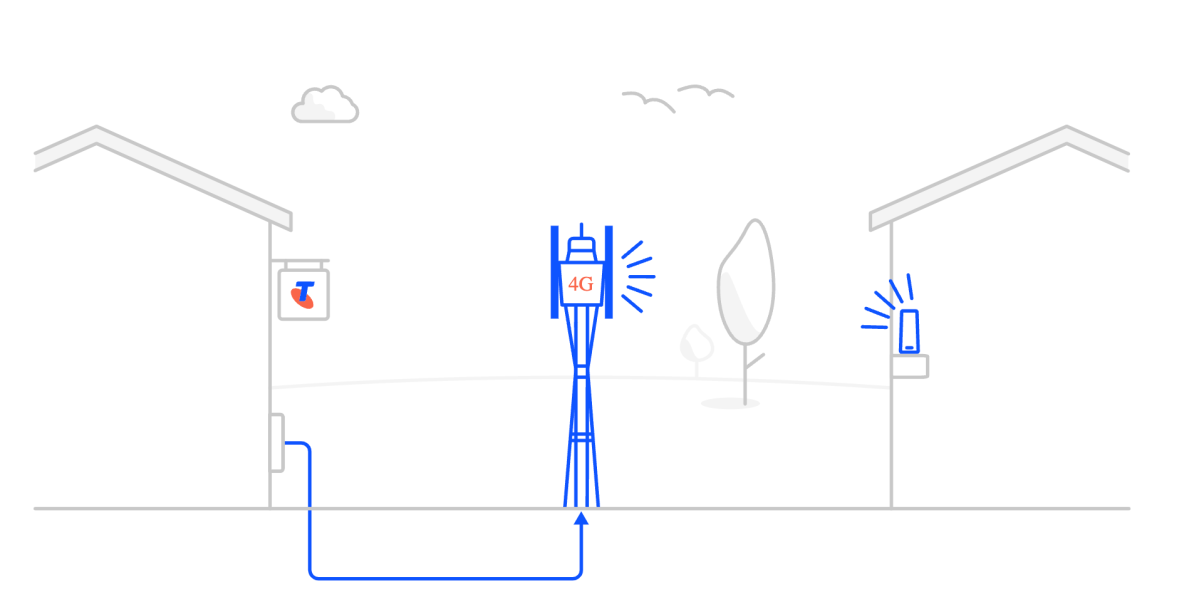
The range of a small cell is dependent on a number of variables. Small cells are only viable when they can be achieved at the right price point, which in simple terms means the site’s antennas (especially for small cells deployed as part of the Black Spot program) are normally mounted on an existing building. Coverage typically therefore extends a radial distance of approximately 300m from the site.
Does it only support 4G?
The small cells we are deploying are 4G only. Telcos believe that this provides support for advanced voice and data features at the best cost point. Addition of 3G capability would significantly add to the deployment cost and render it economically unviable.
And therefore they need to use Voice over WiFi
Voice calls on 4G small cells require the handset to support VoLTE (Voice on LTE). If the handset also supports Voice over WiFi (e.g. the new Samsung S8 & S8+ blue tick phone) then it will seamlessly handoff from VoLTE (outside coverage) to VoWiFi if say a premise has fixed broadband connected to a WiFi access point.
If a community wanted to upgrade the small cell to increase coverage, is that something we’d consider.
The viability of a small cell program relies on a low cost solution delivering an acceptable coverage solution for our customers. The rollout of the Small cell program for the Federal Government Blackspot program is a good example of this. Telcos always aim to maximise the coverage we provide for a community within the funding constraints. If a community wishes to contribute towards augmentation of a site then we are happy to review that on a case by case basis.
Thanks to Telstra for the above information on small cells.
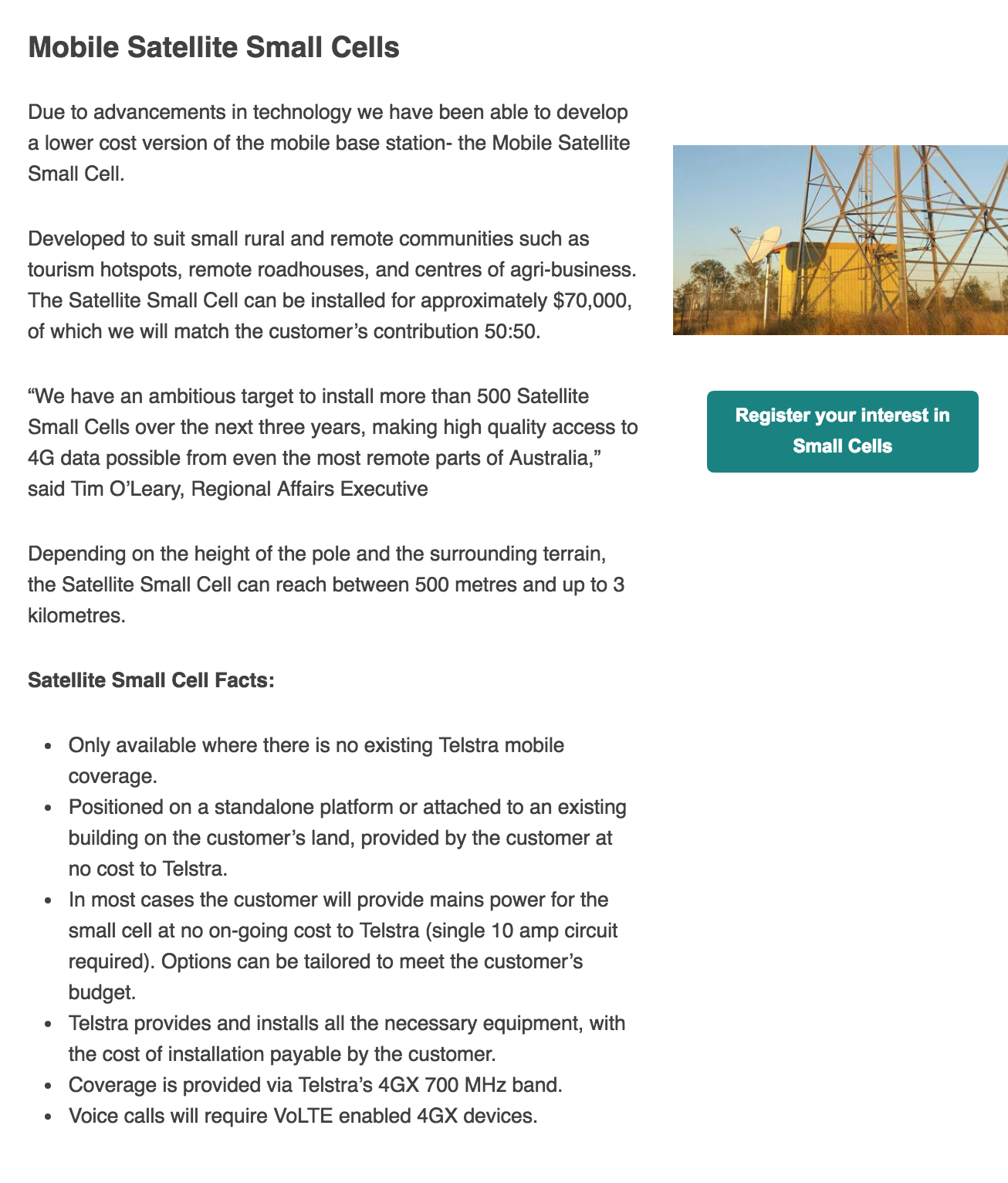
Telstra have also developed a lower cost version of the Mobile Satellite Small Cell, see details below. To register your interest in a small cell, contact Telstra via email – TelstraRegionalAffairs@team.telstra.com
*Please note, while all care has been taken in compiling BIRRR documents, we recommend that you check with your service provider regarding your own connection issues and best plans available.
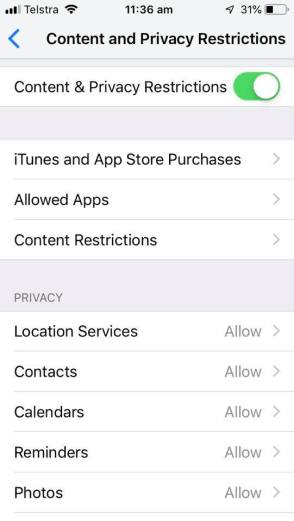
With the Apple Screen Time feature, you can access real-time reports about how much time you spend on your iDevice and set limits for what you want to manage. With Content & Privacy Restrictions in Screen Time, you can block or limit specific apps and features on yours and your child’s device, as well as restricting the settings on iPhone, iPad, or iPod touch for explicit content, purchases and downloads, and privacy. iDevices need to have iOS 12 installed.
How to turn on screen time
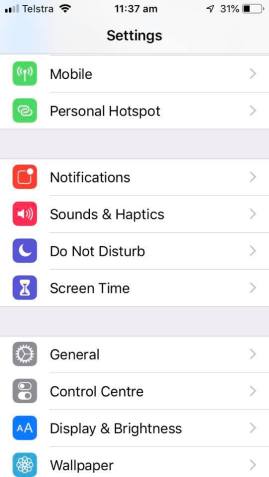
On your device, go to Settings > Screen Time.
Tap Turn On Screen Time.
Tap Continue.
Select This is My [device] or This is My Child’s [device].
How to use screen time features
Once Screen Time is turned on, on each device you can get a report about how you use your device, apps, and websites, any time you want.
If it’s your child’s device, you can set up Screen Time and create settings on their device or you can use Family Sharing to configure your child’s device from your own device. After you set up your child’s device, you can also use Family Sharing to view reports and adjust settings any time, right from your own device.
With Screen Time you can also create a dedicated passcode to secure settings, so only you can extend time or make changes. Make sure to choose a passcode that’s different from the passcode you use to unlock your device. To change or turn off the passcode on your child’s device, tap Settings > Screen Time > [your child’s name]. Then tap Change Screen Time Passcode or Turn Off Screen Time Passcode, and authenticate the change with Face ID, Touch ID, or your device passcode.
View your report and set limits
Screen Time gives you a detailed report about how your device is used, apps you’ve opened, and websites you’ve visited, any time that you want to see it. Just go to Settings > Screen Time, select the device and tap the blue line under the time to show the graph. You can see daily or weekly stats on screen time usage. You can also set limits for your most used apps, and see how many times a device was picked up or received a notification. If you turned on Share Across Devices, you can view overall usage across devices that are signed in with your Apple ID and password. The report feature also allows you to see when the phone is being used, how long is being spent on each app/site and how many pick ups and notifications the device gets.
Downtime
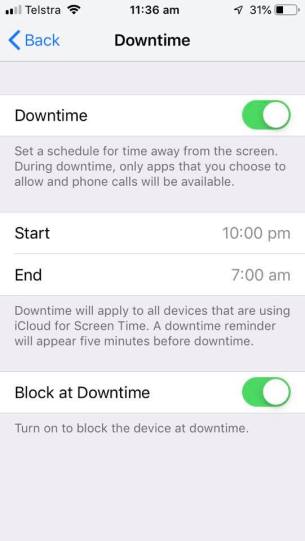
When you schedule Downtime in Settings, only phone calls and apps that you choose to allow are available. Downtime applies to all of your Screen Time-enabled devices, and you get a reminder five minutes before it starts. You can set a specific downtime for each device and also select certain apps that are excluded from the downtime (such as messages, calls, maps etc). Phone, Messages, FaceTime, and Maps are Always Allowed by default, but you can remove them if you want.
App Limits You can set daily limits for app categories with App Limits. For example, you might want to set a limit on social media during exam block or while you are at work. Limits refresh every day at midnight, and you can delete them any time. Your child can also request ‘extra time’ if they go above the set limit on an app. Select the device you want to add a limit too and click on Add Limit, select the app and a time you want the device limited to.
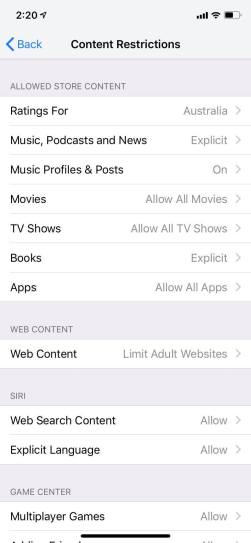
Content & Privacy Restrictions You decide the type of content that appears on your device. Block inappropriate content, purchases, and downloads, and set your privacy settings with Content & Privacy Restrictions. You can block explicit movies & music, multiplayer games and certain web content, if you scroll down you can even block specific websites.
Do Not Disturb
Just above Screen Time in settings is a feature called Do Not Disturb. This has a fabulous feature that limits notifications while you are driving. You can set this up to text contacts with a message saying you are driving and will call when you reach your destination.
Use Screen Time with your family
With Family Sharing, you can share music, movies, apps, and more with family — and it also works with Screen Time. You can view reports and adjust settings for children in your family any time, right from your device. If you’re already in a family group, go to Settings > Screen Time, and tap your child’s name. If you need to create an Apple ID for your child, go to Settings > [your name] > Family Sharing > Screen Time.
Or if you’re new to Family Sharing, tap Set up Screen Time for Family and follow the instructions to add a child and set up your family. You can add family members any time from Family Sharing settings. To use Screen Time with Family Sharing, you need to be the family organizer or parent/guardian in your family group, on iOS 12. Your child must be under age 18, in your family group with their own Apple ID, and on iOS 12.
Disclaimer: BIRRR are not specialists in this area, this is just one tool you can use to manage yours and your child’s device. BIRRR encourages you to read widely on this topic if you have primary or secondary age children and reminds parents that many social media platforms require children to be at least 13 years of age.
Thanks to Apple Support for instructions on Screen Time Features
Telstra NGWL services are being decommissioned when the Telstra 3G network is shut down on 28th October 2024. Telstra will migrate customers to newer technologies before the 3G closure. Most customers will be migrated to Telstra’s 4G Fixed Wireless network (4GFW). Telstra have stated they “will be working to ensure the voice service will meet current USO requirements“. You may also hear this new voice service referred to as 4G Home Voice, a wireless landline or 4G landline / home phone & possible other name variations. More information on Telstra’s 3G network closes on 28th October 2024here
What is 4G Fixed Wireless
4G fixed wireless (4GFW) is a type of connection that utilises 4G LTE (Long-Term Evolution) wireless technology (4G mobile) to provide broadband and voice services to your premises. More details from Telstra here.
Migration process:Existing NGWL users will receive a text, mailed letter and/or an email regarding the migration process. These are being done in batches and all NGWL customers in an area will not receive the migration information at the same time.
To arrange migration Telstra needs to be contacted on 1800 258 503. They are open from Monday to Friday, 8am to 7pm AEST. If you haven’t received any correspondence as yet, BIRRR encourages NGWL users to contact the migration team ASAP.
What you need to know when migrating your NGWL service with Telstra – click here.
BIRRR – NGWL Migration Assistance. If you are experiencing migration issues, please complete this BIRRR – NGWL Migration Assistance form and BIRRR will escalate with Telstra.
Equipment Needed: NGWL consumers will need a Telstra Smart Modem and in some cases a compatible antenna to transition to 4GFW. If you already have an external antenna, Telstra expect that in most cases this will be re-usable with the 4G FW solution. The Telstra Smart Modem (Generation 3) will have an antenna port allowing for connections to the external antenna (if you have one). In most cases you will be able to use your existing telephone handset.
In some cases Telstra will send out the smart modem and instructions for you to self install, in other cases a technician will need to attend your premises to install additional equipment, such as a compatible antenna.
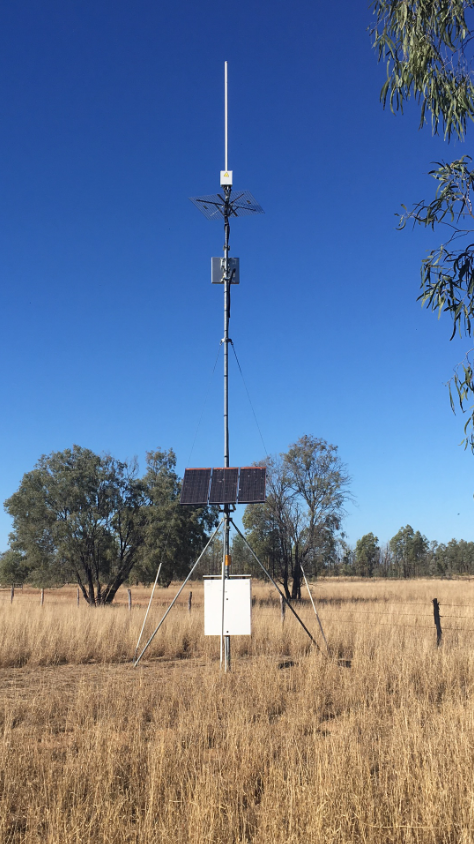
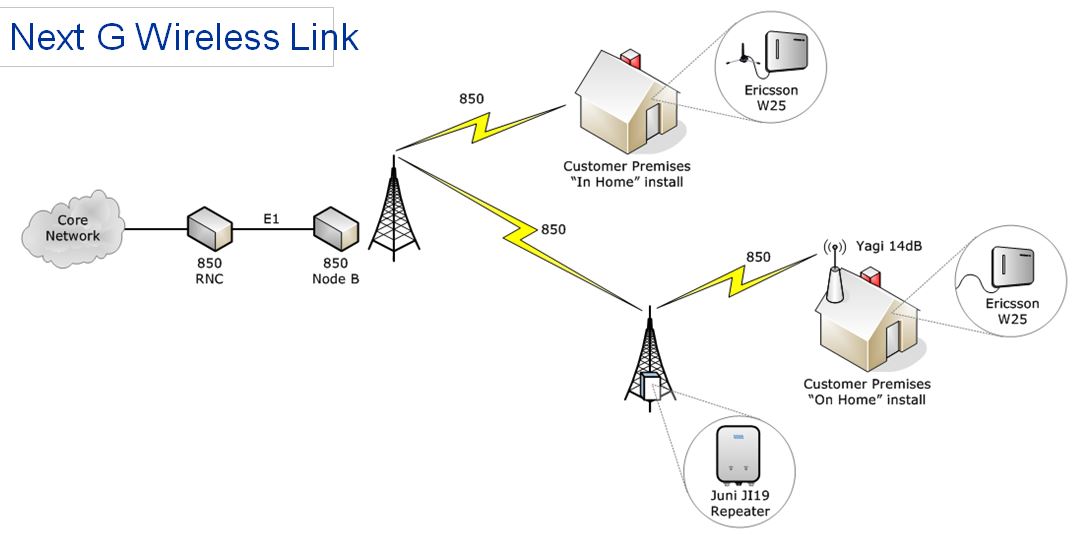
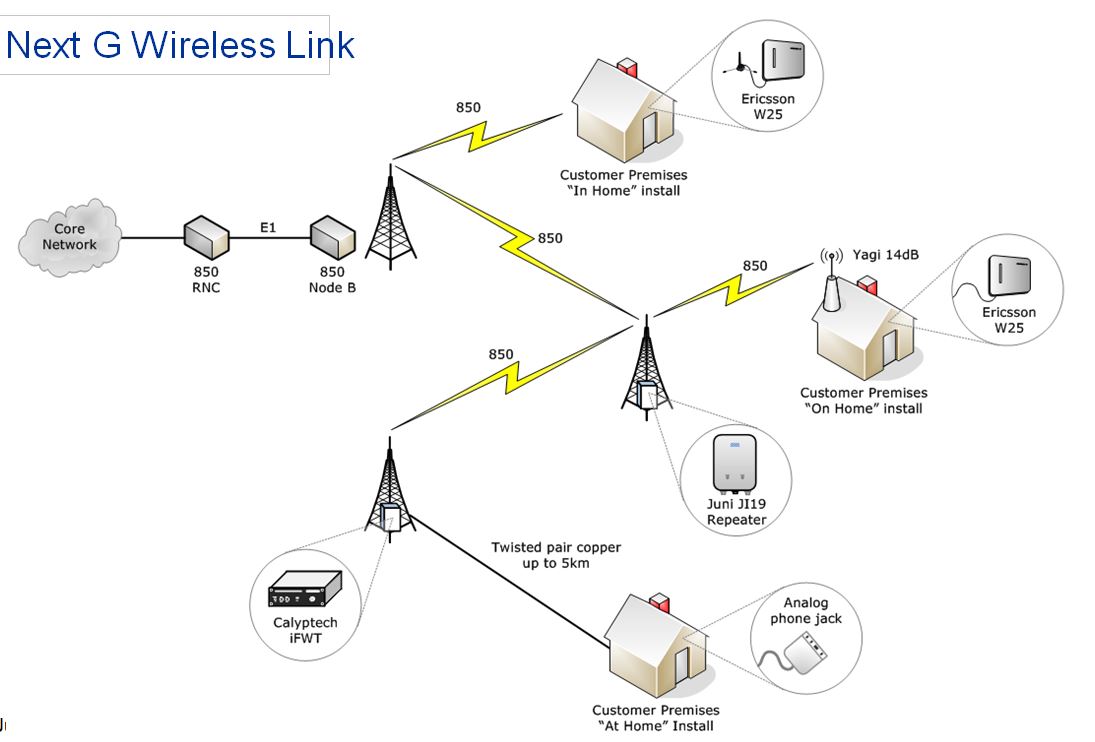
Some consumers may have extra equipment at their location including a repeater tower, cel-fi set up, antenna etc (as pictured below). BIRRR has sought further clarification from Telstra as to the future of this equipment. Please be aware that if you choose to cancel your landline service this may affect your existing mobile coverage, especially if you have any of the equipment shown below.
Examples of a NGWL repeater tower, equipment and antenna, with new 4G FW equipment installed.
Costs:A voice service delivered via 4GFW with the smart modem and antenna (if required) is supplied by Telstra. There are two plans available:
Telstra Upfront Home Phone Plan is $50 per month.
Upfront Starter Plan (with 50GB data allowance) is $65 per month.
Telstra Upfront Home Phone Plan & Upfront Starter PlanSpecifics
Plans are not contracted. Customers can change plans or cancel at any time, at no cost. However, if customers decide to cancel their service within the first two years, they will need to return the modem back to Telstra or pay a $200 fee.
Inclusions: The 4GFW Telstra Upfront Home Phone Plan voice service will include 2GB data (The 2GB of data is incidental to the phone plan and only suitable for very limited internet usage – there is a possibility of data unavailability during peak hours for some customers on the 4GFW network.). Telstra’s CIS is here.
The TelstraUpfront Starter Plan includes a 50GB data allowance. Telstra’s CIS is here.
Both plans also include:
MessageBank, Caller ID, Same number porting
Caller Line Identification and Directory Listing are disabled by default and will need to be activated by the customer via the Telstra app. Unfortunately, any saved Message bank messages cannot be migrated and will be deleted once the NGWL service is disconnected.
Unlimited local, nation, mobile and 13 number calls
30 minutes of standard calls to any overseas countries.
BIRRR recommends consumers should look at other options for broadband, as these plans are data capped. The Regional Tech Hub can produce a free independent connectivity report to advise on broadband options.
NB: although Telstra mentions your plan is unlimited, once the data limit of 2GB or 50GB (depending on your plan) is exceeded, your broadband speed will be capped at 256kbps until the next month.
Power, Priority Assist & Medical Alarms:You will not be able to use your 4G FW service in a power failure – including emergency calls, any back-to-base alarm or medi-alert functionality, without a back-up in-home power source. If you have a back to base security alarm or a medi-alert, you will need to check with the manufacturer to make sure it is compatible.
Priority assist will be available on this technology. Telstra will supply a battery backup device for all Priority Assistance customers that will help provide short term connectivity in the event of a loss of power. This backup battery will not be included as part of a standard setup for non-Priority Assist.
Please ensure any mobile devices, medical alerts and other 3G equipment is compatible with the 4G network as 3G is being closed down. More details here
User Provided Equipment for Power Redundancy
If you live in an area prone to power failures/outages BIRRR recommends a non-powered phone (cordless phones will not work during power outages), which can be purchased from Telstra here for $48 and an Uninterruptible Power Supply for the Telstra Smart Modem which can be purchased from Telstra here for $120, this provides a power back up of approximately four hours. You can also purchase power redundancy and non – powered phones from other suppliers such as Harvey Norman, Officeworks, JB Hi-Fi etc.
IMPORTANT: Please ensure you have power redundancy, such as a uninterruptible power supply (UPS), battery or generator. Your voice service will not work in a power failure, without power redundancy.
If you require a longer length power solution a power station like the Energizer Everest 1100 Power Station, will provide power redundancy for your Telstra Smart Modem for 12 – 18 hours, a solar panel can also be added to the power station to enable charging via solar. Available from Mitre 10, Bunnings and other retail stores. BIRRR recommends a Google Search to find the current best available price (typically around $1000).
Recycling. The best way to recycle your old device is through MobileMuster, the Australian mobile industry’s official recycling scheme.
Billing and Payment: Telstra is in the process of rolling out a new billing software system. For customers still on the old billing system, their new service will be listed on Telstra’s new platform and in the short term, this may mean two separate bills. Ultimately all of Telstra’s existing accounts will be moved to the new system and all services will appear on one bill again. The new bills do not currently display customer ABNs. This feature has been requested and is in development for a future update. AutoPay from a credit or debit card (Visa, MasterCard or American Express) or a bank account. You can also call Telstra on 132 200 or visit one of their stores.
Same number porting:Customers can retain their existing phone number. Every service has a unique phone number. When the 4GFW service is first connected, as part of the migration Telstra will provide an interim phone number. Once the service technology is confirmed as working, Telstra will migrate the existing NGWL phone number onto the 4G service and then cancel the NGWL service and the interim 4GFW number.
Support: You can sign in to My Telstra to check your service, run simple tests and automatically raise a fault ticket. The My Telstra App uses a 2-factor authentication process and has multiple options such as text messaging, email and a pin to verify your sign in.
Telstra have advised that customers should use the contact us details to raise a fault and speak to an agent to help you resolve issues. You can also call Telstra on 132 200 or visit one of their stores.
At this stage Telstra DO NOT plan on having a specialised support number for this service, similar to the 1800 MYNGWL.
Satellite Voice (powered by Starlink)
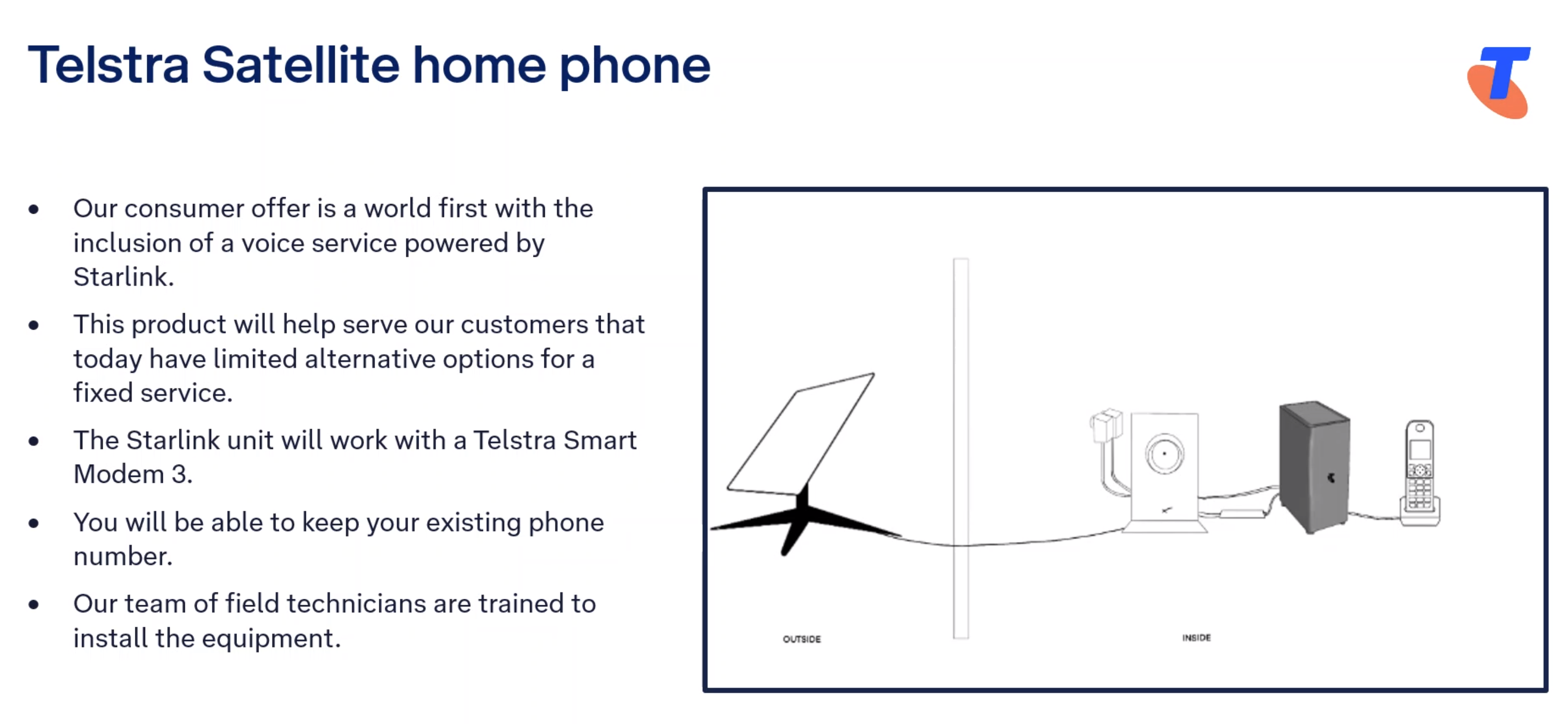
Some NGWL customers (those who don’t have adequate mobile coverage at their location), will be transitioned to a Starlink voice service. Telstra have stated that this service is “USO complaint”, which means that if you are migrated to a Starlink voice solution Telstra will cover the cost of the Starlink equipment and installation. It also means that Telstra need to ensure the service meets Consumer Service Guarantees under their Universal Service Obligations.
It is likely that current NGWL customers using the Analog phone jack inside their premises will be moved to a Telstra/ Starlink voice service, particularly if they have no existing mobile coverage at their location i.e. for NGWL connections that utilise a copper landline connection to the tower (image of NGWL varieties at the bottom of this page).
Satellite Voice (Powered by Starlink) Plan Details here
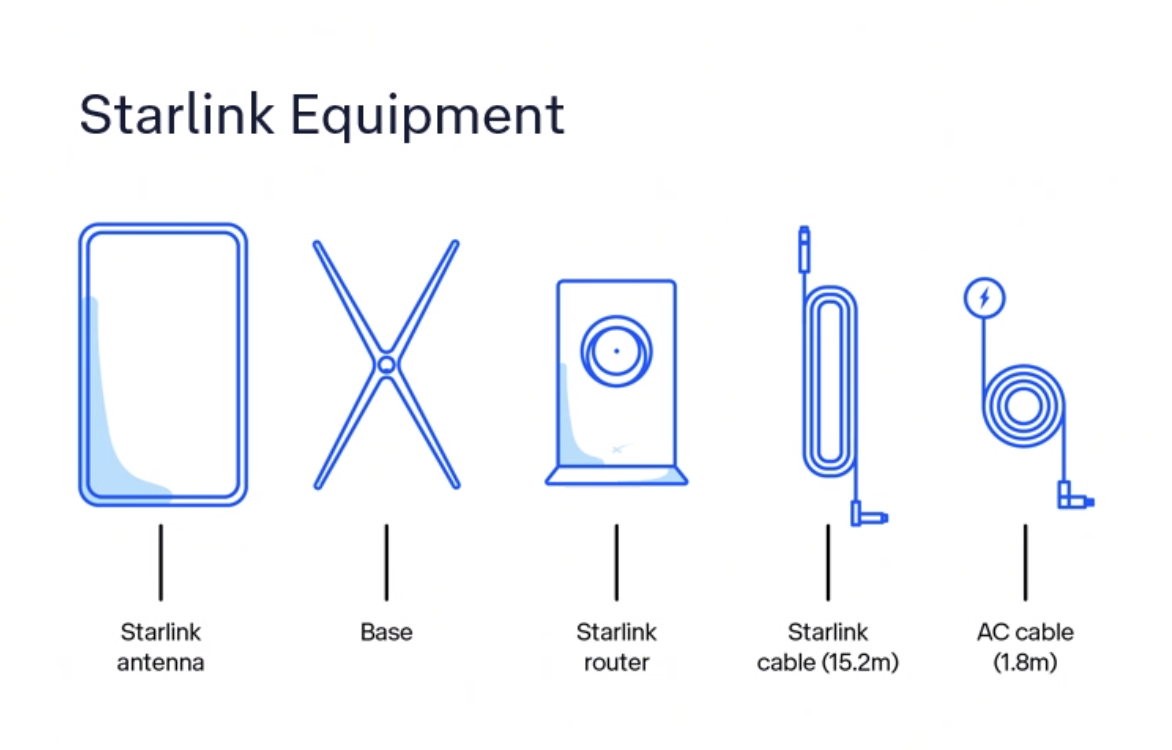
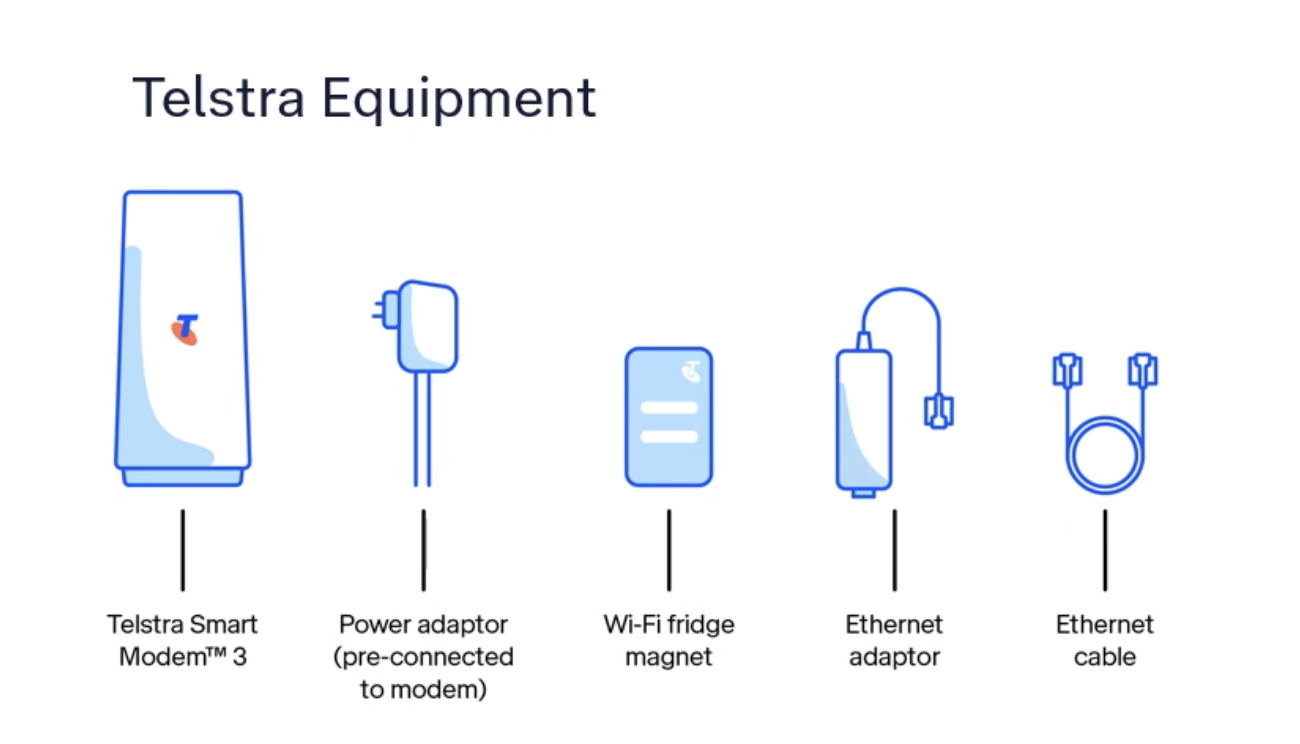
If you are being migrated to the Starlink voice solution you will receive two sets of equipment.
The Starlink voice service will be $50 per month for a voice only service (with all local, national, mobile and 13 calls included).
BIRRR has the following page with details on the new Telstra Satellite Home Internet (Powered by Starlink) product offering. Please note that the Telstra Satellite Home Internet has different pricing and inclusions to the USO compliant voice service offering, in particular in regards to installation and equipment costs.
You do not have to bundle broadband and voice to receive this product and BIRRR highly recommend you ensure you have an alternate method of communication, so that you have redundancy in communications. If you already have a Starlink kit we do not recommend you use this kit for the Telstra voice solution. You should request a new kit and installation from Telstra for your voice service.
Billing, same number porting, ID checks, accounts, support and power redundancy information listed above will all be also relevant for the Starlink Home Voice solution.
Things to note:
A Static IP is not available for Telstra Satellite Internet services.
Telstra Satellite Internet is restricted to use at the home address it is connected to. Satellite Internet can’t be moved around or used on moving vehicles or vessels like cars, vans, RVs, boats or aircraft. Customers will need to contact Telstra to move their Telstra Satellite Internet service, similar to other fixed line connections.
There is some voice prioritisation that occurs locally on the customer’s service but there is no voice prioritisation across Starlink’s network.
The manufacturer’s warranty is 24 months from the date of the original purchase.
Customers can message Telstra, use the My Telstra app, call Telstra’s contact centre or visit a store. There is no dedicated number for Starlink support, you will be prompted with questions to reach the right support team. More information on how to contact Telstra for Starlink support here.
If Telstra elects that the customer’s voice service needs to be migrated to Telstra Satellite powered by Starlink, and the customer meets Priority Assist requirements, then Priority Assist is available.
Telstra has been conducting trials of the Starlink product over many different locations, throughout various states for many months. This testing has covered everything from the impact of rain, voice performance, service up time and general home usage. Telstra are continuing to undertake testing to gain further information about this technology.
About NGWL
NextG Wireless Link (NGWL) used the 3G Telstra mobile network to provide home phone services to some customers in rural Australia. It was a landline voice service supplied by Telstra in order to meet their USO (Universal Service Obligation) obligations. The service operated via the 3G mobile network, with consumers being migrated to newer technologies in 2024, due to the closure of the 3G network. It is believed that there were over 5000 NGWL services Australia wide.
NGWL used the coverage and data capabilities of Telstra’s 3G 850MHz network to provide a Voice ( landline service) and limited Broadband internet (limited in data and speed, with high costs)
The NGWL service was supplied by Telstra in several different formats, using a variety of different equipment options. The service did not provide calls at 3.1kHz bandwidth. Telstra offered a dedicated support line for NGWL consumers – call 1800 MY NGWL (1800 696 495 ) however they have stated they will not be offering dedicated support numbers for 4GFW or Starlink voice solutions.
Telstra applied the Customer Service Guarantee (CSG) to its NGWL services in 2018. Historically, Telstra’s NGWL customers opted for the service in place of a USO standard voice service on a fixed copper line. These customers made an informed choice to take up NGWL as an economic alternative to copper installation or replacement of High Capacity Radio Concentrator (HCRC)landlines.
Developed for BIRRR by Kristy Sparrow, Julie Stott & John Kitchener updated 12/05/24
*Please note, while all care has been taken in compiling BIRRR documents, we recommend that you check with your service provider regarding your landline service and your rights as a consumer under the Universal Service Obligation.
VoWIFI or WIFI Calling is currently supported by the Telstra, Optus and Vodafone networks. It allows you to make and receive calls with a compatible mobile phone using your home internet (you don’t need mobile coverage).
The Regional Tech Hub have the latest information here
*Please note, while all care has been taken in compiling BIRRR documents, we recommend that you check with your provider regarding WIFI Calling. Thanks to BIRRR member John Kitchener for compiling this document.
Telstra Air is Free Wi-Fi at thousands of Telstra Air hotspots across Australia for eligible Telstra mobile (available 15 December 2015 – 30 June 2016 ONLY) and broadband customers. You can check your eligibility here: TELSTRA AIR
There are two options for Telstra Air:
OPTION 1 Mobile Customers: For those using mobile phones, prepaid devices, sim only plans etc. You can access the internet via FREE Telstra Air Hotspots from 15 December 2015 to 30 June 2016. If you activate the offer, you’ll get access at no charge to available Telstra Air Wi-Fi hotspots in Australia for your personal use until the end of the offer period.
NB: BigPond Mobile Broadband, satellite mobile broadband and business customers are NOT eligible.
OPTION 2 Home Broadband Customers: If you have ADSL, Cable or NBN connection and have a compatible gateway you can become a member of Telstra Air. This uses your home data allowance when you are away from home, it accesses the internet via Telstra Air hotspots. You will need to become a Telstra Air member first.
The Telstra Air App is also a quick and easy way to connect, locate hotspots and more
I’m a bigpond mobile broadband customer for my home internet plan and a business customer for my mobiles, which makes me ineligible for Telstra Air. However thanks to the generosity of fellow BIRRR members I have been offered Telstra Air passwords (for Option 2) to use when I am travelling. You may also be able to find family or friends who have large home broadband accounts that are willing to share their data.
*Compiled by Kristy Sparrow for BIRRR 15/1/2016 Please note, while all care has been taken in compiling BIRRR documents, we recommend that you check with Telstra regarding your plans and the use of Telstra Air.
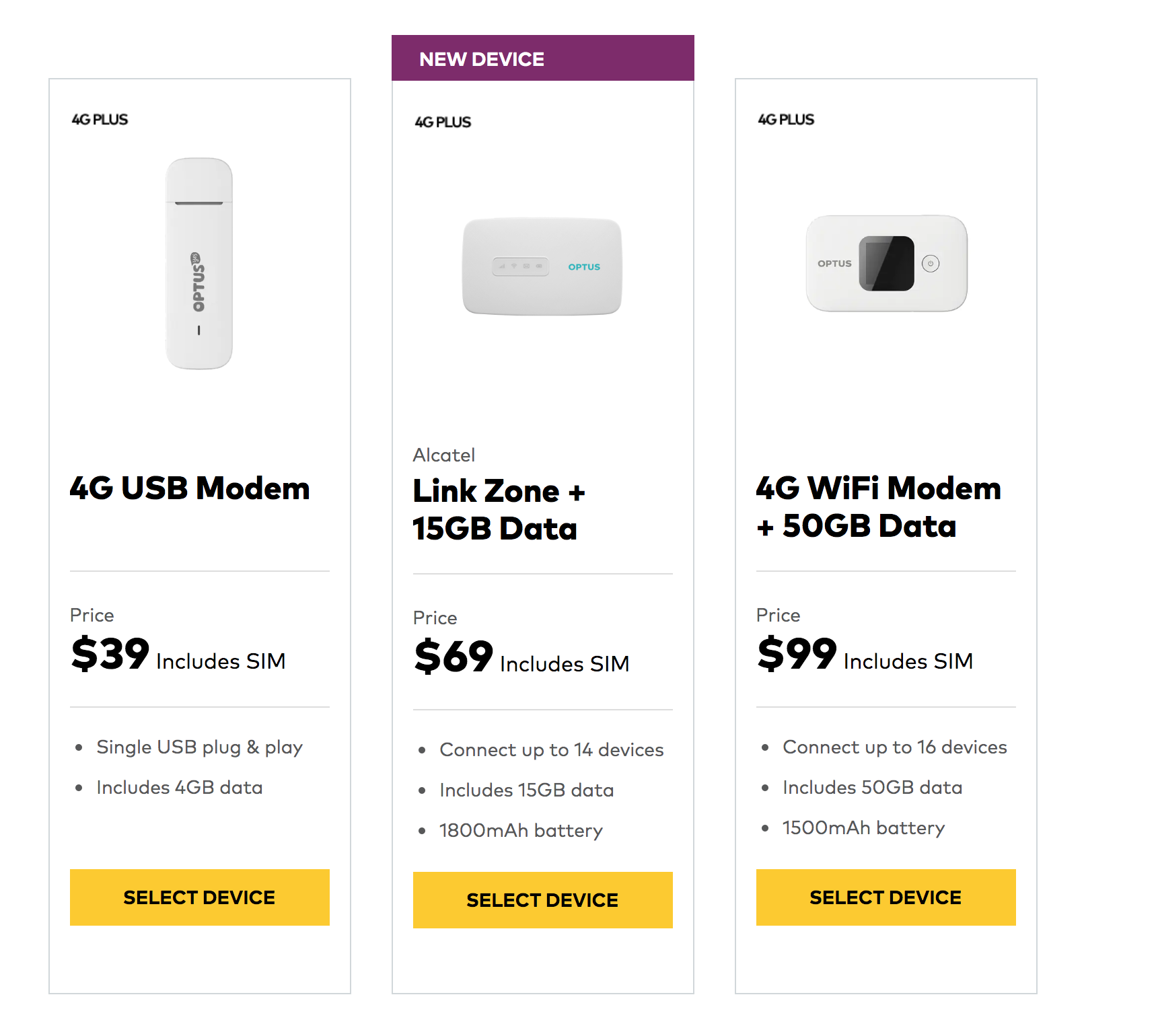
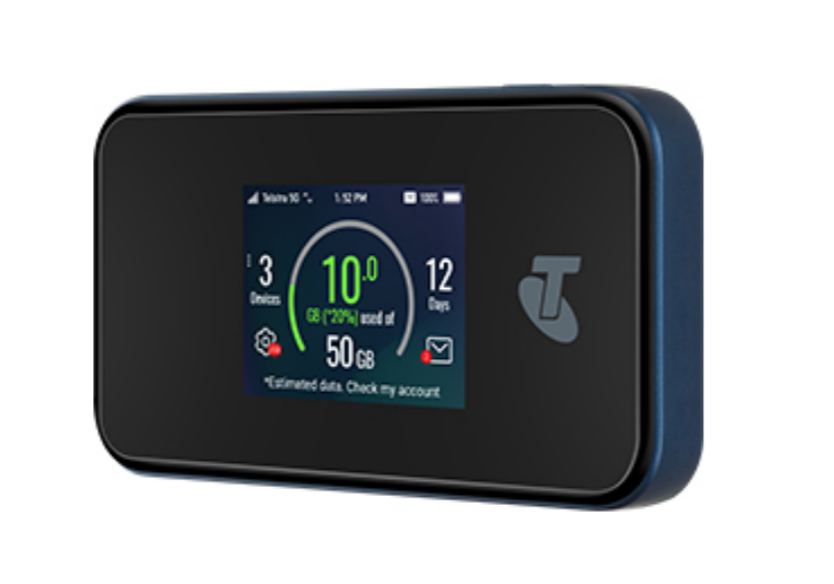
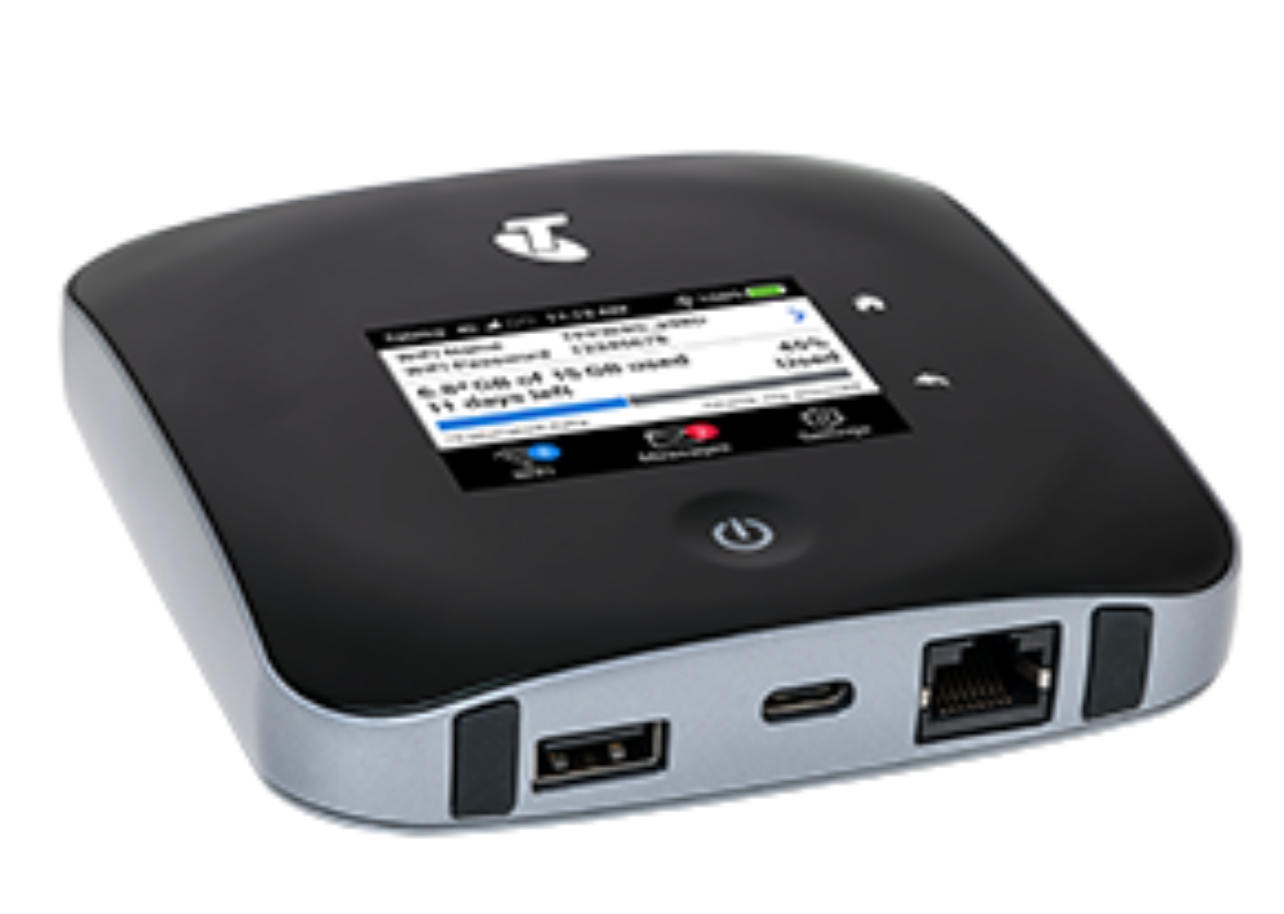
A modem is a device that allows access to the internet. Some of the modems listed below are also routers, meaning they supply a wifi connection for use with multiple devices.
Must have Optus coverage. Signal and speed may be improved by adding an antenna to the modem (check specifications to see which devices have antenna ports and for further details on available plans).
200GB $99.95/mth (includes modem) or $75/mth (no modem) 24 Month Contract
Must have Telstra 5G coverage. Signal and speed may be improved by adding an antenna to the modem. Telstra currently offers 5G in select areas and is progressively rolling it out to other areas. In non-5G coverage areas, you’ll automatically switch to 4G or 3G. Check coverage at telstra.com/coverage
200GB $91.00/mth (includes modem) or $75/mth (no modem) 24 Month Contract
Must have Telstra 4G coverage*. Signal and speed may be improved by adding an antenna to the modem.
NB: In BIRRR’s experience these modems do not perform well in 3G only areas
The Telstra Mobile Network offers 4GX in all capital CBDs and selected suburban and regional areas and is progressively rolling out to more places. In other coverage areas around Australia, you’ll automatically switch to our fastest available 4G or 3G. Check coverage attelstra.com/coverage
Must have Vodafone coverage (heck your coverage with the Coverage Checker). Modem and plan specifications are detailed here. Also available as a PrePaid device.
Must have Vodafone coverage (check your coverage with the Coverage Checker). Modem and plan specifications are detailed here.
NB Tec
NB Tec are a solutions specialist, their Longreach Modem solution is a modem/antenna & booster in one that can connect to Telstra, Optus or Vodafone mobile networks.
Mobile Signal Enhancement
The above modems from carriers can be used in conjunction with a repeater and / or antenna to increase signal strength and speed.
*Please note, while all care has been taken in compiling BIRRR documents, we recommend that you check with your service provider, regarding your own connection issues and required equipment and plans.
Everyone is familiar with landline and mobile phones. There are a number of alternative voice technologies that you may use over your internet connection. They can provide a reliable alternative or back-up voice service and they are inexpensive.
VoIP
VoIP can be an exhausting topic. In a nutshell it is a relatively cheap and reliable way of voice communication and can work well over satellite and other internet connections. You may use a standard analogue phone handset, or a dedicated VoIP cordless phone system etc. VoIP is available over the Interim Satellite Service and an improved VoIP service is now available over the Long Term Satellite Service (Sky Muster). Click here to read more on VOIP over Sky Muster.
For more details regarding a VoIP service, talk with your RSP or arrange for a VoIP service with a VoIP only service provider.
Skype
You may use Skype for voice calls, with the Skype app installed on your smart phone or computer. You can call home and mobile numbers for a small cost. See http://www.skype.com/en/features/call-phones-and-mobiles/. You may also purchase a Skype cordless phone which LAN cable connects to your internet router. See http://dualphone.net/
*Please note, while all care has been taken in compiling BIRRR documents, we recommend that you check with your service provider, regarding your own connection issues.
Illegal boosters carry a large fine as they can interfere with the mobile network.
” It is an offence under the Radiocommunications Act 1992 (the Act) to operate an unlicensed radiocommunications device, or possess this device for the purpose of operation. A person found guilty of this offence may be imprisoned for two years for each offence. A body corporate may receive a penalty of up to $270,000 (1,500 penalty units) per offence (sections 46 and 47 of the Act). Other penalties may apply, such as the interference offence provisions at Part 4.2 of the Act.” ( ACMA)
The key components of a passive antenna installation are:
Selection of the correct antenna. The correct antenna is one that works for the bands/ frequencies that are broadcast by your service provider at your location. BIRRR recommend reading through our mobile network enhancement page and getting a desktop site survey done. The chosen antenna must have appropriate directional gain. Where there are several competing towers, an omni-directional antenna might be suitable. For some locations, a good internal antenna placed in an optimum location by a window, may be all that is required. See Telco Antennas – Antenna Selection Guide , it explains which antennas work best in various geographic locations.
Antenna location ie how high, best location on roof etc. This can be a tedious task, but well worth the effort. It is known as the ‘antenna dance’. If you get signal outside, your mobile phone may be used to find the spot with strongest signal. Ensure that your phone supports the same bands as your modem and the service that you are ‘chasing’. Follow the directions listed in this document. The signal level will display in a negative value in dBm. The lower the negative value the stronger the signal e.g.-81dBm is stronger (better) than -89dBm.
A suitable mast. Your TV antenna or your satellite dish mast may be suitable, but then again they may be in a poor location for mobile data.
Where to best point a directional antenna. Your desktop signal survey will have located the towers which service you. Use Google Earth or similar to determine the direction of these towers from your location. Point your antenna accurately by using local landmarks that indicate the direction of the required tower.
A gas arrestor may assist in lightning protection of your equipment. Install a gas arrestor and grounding (as required). Seek professional advice for optimal installation of these devices. Contact your equipment provider.
Once the installation is complete, re-check the signal level and fine tune the antenna direction by using your indoor modem, hotspot mobile phone or Cel-Fi repeater signal level screen. This will also check that your coaxial connections are sound.
Coaxial connectors cause signal loss. Good quality connectors minimise this. Use N-type connectors where possible e.g the antenna to cable connector. See this guide for further information on Telco Antennas coaxial cable types and connectors. Ensure that all external connections are waterproofed with self amalgamating butyl rubber tape.
Ensure that the coaxial cable run from antenna to equipment is as short as possible and is the best lowest loss cable that you can afford. It is no good installing a great antenna, only to lose precious signal and potential performance by using poor quality, high loss coaxial cable. Locate the phone, modem or Cel-Fi device as close as possible to the antenna.
Choose the correct pigtail to interface your coaxial cable to your modem, hotspot, phone or Cel-Fi repeater. The pigtail is a short flexible piece of coaxial cable which adapts to your device.
A diagram of a typical external antenna installation, which identifies the key components, follows. If a MIMO installation is required install two cable runs etc. More on MIMO below:
Signal levels and the mysterious dBm
Your phone or modem can be used to display signal levels in dBm. It is important to understand the differences between a 3G signal level and a 4G signal level and how this translates to quality of service.
GSM & 3G networks (RSSI)
The 3G signal level is identified by a measure called RSSI (Received Signal Strength Indication) and is measured in dBm. RSSI is a measure of the available signal plus the noise in band. A level of -50dBm is a perfect signal and at -110dBm (usually earlier) you’ll lose the 3G connection.
-50dBm to -75 dBm – High Signal (good voice and data)
-76dBm to -90 dBm – Medium Signal (good voice and data)
-91dBm to -100 dBm – Poor Signal (good voice data, marginal data with drop-outs)
-101dBm to -109 dBm – Very poor Signal ( voice may be OK, no data)
-110dBm to -113 dBm – No signal
4G/LTE (RSRP)
LTE signal strength is measured in RSRP (Reference Signal Received Power). The 4G RSRP signal level measure is as a ‘rule of thumb’ around -20dBm lower than the 3G RSSI measure, such that 100dBm (RSSI) would equate to around -120dbm (RSRP). RSRP is a more accurate measure of signal strength than RSSI, as it excludes noise and interference on the network. It measures just the usable portion of the signal. Although the 4G RSRP signals appear lower, it does not mean your signal level is worse.
-50dBm to -90dBm strong signal (stronger signals are possible), fast data
-91dBm to -105dBm good signal, fast data
-106dBm to -112dBm fair signal, useful and reliable data speeds may be attained
-113dBm to -125dBm reliable data possible, performance may be slower, increased latency
-126dBm to -136dBm performance will drop dramatically
MIMO is a very clever RF technique that effectively doubles the bandwidth of a radiated 4G carrier. It is not available for 3G in Australia. A MIMO antenna installation may double the download speed at your location. Effectively it is something for nothing, (well almost nothing).
Note: And example of the use of MIMO is WIFI and it is used to increase speed of WIFI transmission. Those two (or three or four or more) antennas on your wireless router use MIMO.
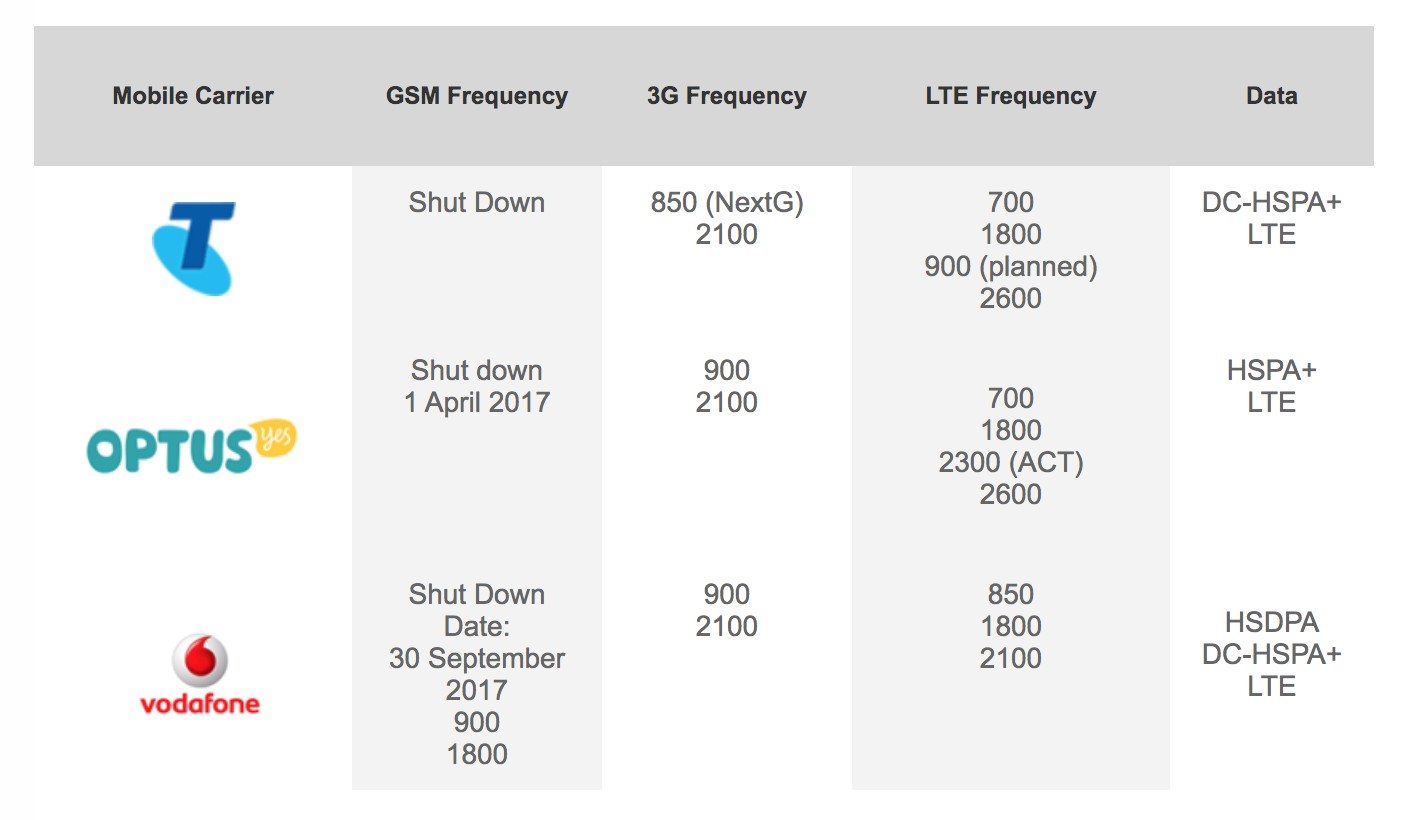
NB: Telstra will be switching off 3G in 2024. With this in mind BIRRR does not recommend spending large amounts of money on boosting 3G service. 3G is being replaced with 4G (if spending any money on antennas or repeating equipment please ensure these are 4G compatible) and also be aware that boosting 3G service may not deliver faster speeds or reliability.
*Please note, while all care has been taken in compiling BIRRR documents, we recommend that you check with your service provider, local government and local installer regarding your own connection issues and infrastructure needed.
Prepared by BIRRR in conjunction with John Kitchener and Telco Antennas
The Australian Government is improving mobile phone coverage and competition in regional and remote Australia through the Mobile Black Spot Programme (MBSP). As of 18/3/19 there have been 4 rounds of Federal Government MBSP funding. You can read more about the types of base stations that are used in the MBSP program, including small cellshere.
How MBSP were funded (all 4 rounds)?
Over $220 million has been committed by the Federal Government through the Mobile Black Spot Program to improve mobile coverage across Australia.
1047 locations around Australia will receive improved coverage under the four funding rounds of the Program (Round 1: 499, Round 2: 266, Round 3: 102, Round 4: 180).
Thanks to working cooperatively with state and local governments as well as the three major carriers (Telstra, Optus & Vodafone) and community and private sector groups locally, the total amount to be invested under the program is $760 million.
As of 15 March 2019, 682 sites have been switched on.
Base stations under the first three rounds are expected to be operational by 30 June 2019. Round 4 base stations are expected to roll out shortly, with the first new base stations being activated by the second half of the year.
Rollout sequence is being determined by the carriers, based on various factors, such as obtaining local government planning approval and landowner agreement where necessary, and/or the ability to access existing infrastructure, power and backhaul.
Every $1 of Commonwealth money has leveraged nearly $3 of contributions from other sources. The program will boost competition in mobile communications.
The first round 1 base stations commenced rolling out in December 2015. The full rollout of all 499 mobile base stations funded under Round 1 is expected to occur over three years. It is estimated that base stations funded through Round 1 of the Programme will deliver handheld or external antenna coverage to all or part of approximately 3,000 of the 6,221 locations on the database. This is because many of these base stations will serve multiple nominated black spot locations. Those black spot locations which have not received coverage under Round 1 will continue to form part of the database, and this database will again be used in the process of determining locations to receive funding under Round 2 of the Mobile Black Spot Programme.
The rules of the program were designed to give the mobile network operators incentives to secure co-contributions from state governments and other sources, with more points going to base stations supported by a co-contribution. The rules also gave each state government an incentive to put in money – because that in turn would maximise the share of the Commonwealth money going to base stations in that state. The result was significant funding from NSW ($24 million), Victoria ($21 million), Queensland ($10 million) and Western Australia ($32 million).
The points scheme also encouraged community contributions – with some remarkable outcomes. Jemalong Irrigation Ltd, which operates west of Forbes, NSW, put in a total of $220,000 and will secure two new base stations as a result. Similarly, in the Boyne Valley region of Queensland, Calliope & District Enterprises Ltd offered a co-contribution of $50,000 while the Calliope Rodeo Association contributed $80,000, which led to a successful proposal for a base station in Ubobo.
Current Mobile Blackspots that have been funded under Round 1
A PDF of the actual mobile blackspots in round 1 ishere
A map of locations which will receive new or upgraded coverage under Round 1 of the Programme can also be viewed on the National Map or downloaded as an Excel file. In addition, as part of Telstra’s proposal, it will deploy up to 200 4G small cell sites in towns around Australia where suitable infrastructure is available, with the locations to be mutually agreed between Telstra and the Government. More details here. Details of the Round 1 Funded Black Spots
Telstra also rolled out further small cell locations to complement the mobile black spot program. The small cell sites were funded by Telstra itself, and are being installed in addition to the 429 base stations built or upgraded by the telco under the AU$94.8 million in funding received from the federal government as part of round one of the mobile blackspot program. More details here
Round 2
Round 2 will see a total of $213 million (GST incl.) being invested in new mobile base station infrastructure. The Australian Government funding for Round 2 has been supplemented by Telstra ($63.7 million) Optus ($36.4 million) and Vodafone ($1.6 million). In addition, six state governments have co-contributed towards Round 2: New South Wales ($8.3 million), Queensland ($13.7 million), South Australia ($1.5 million), Tasmania ($0.35 million), Victoria ($7.9 million) and Western Australia ($21.8 million). An additional $475,000 has been provided by local governments, businesses and community organisations.
The first round 2 base stations are expected to commence rolling out in 2017.
Current Mobile Blackspots that have been funded under Round 2 (yellow square is a small cell and red square is a macrocell)
A PDF of the actual mobile blackspots in round 2 is here
Round 3
The Australian Government has committed an additional $60 million to a third round of funding. As part of this commitment, the Australian Government has announced a number of priority locations which may receive funding for a mobile base station under round 3.
Mobile coverage issues for 19 of the priority locations are already being addressed through previous rounds of the program, an alternative Government program, or through the mobile carriers own commercial investments.
A further $82.8 million in new investment will address the remaining 106 priority locations. The outcomes include:
$45.6 million in Commonwealth funding for 102 mobile base stations (12 Optus, 89 Telstra and one Vodafone), which includes the deployment of Telstra 4G small cells to address specific coverage issues at selected black spot locations.
All macrocell base stations will be provisioned with a minimum of 12 hours of back-up power
Optus and Telstra have recognised the coverage issues identified at four priority locations and advised that they will address these issues commercially.
Funding for the Priority Locations round has been supplemented by Telstra ($34.6 million), Optus ($2.3 million) and Vodafone ($0.3 million).
Round 3 is different to Rounds 1 and 2 as the government nominates which locations it feels should receive funding for a mobile blackspot and it will be up to the Telcos to bid for those locations.
The Australian Government has allocated $60 million (GST exclusive) to the Mobile Black Spot Program to target 125 specific priority locations. The outcome for each priority location is listed in this PDF:
Database of reported mobile black spot locations
Under Round 1 of the Programme, a database of 6,221 locations around Australia was developed, being locations nominated by Australians as needing improved mobile coverage. This database was the starting point for the competitive selection process under which the mobile network operators were asked to nominate where they would build new or upgraded base stations.
Round 4
On 10 June 2018, the Federal Government announced it had allocated $25 million of Mobile Black Spot Program funding towards a fourth round, to deliver improved mobile coverage to more regional and remote communities across Australia. Round 4 funding specifically targeted coverage issues at public interest premises, such as tourist sites and emergency services facilities and locations were announced during the week of 18/3/19.
Round 4 of the Mobile Black Spot Program is delivering 180 new mobile base stations (49 Optus and 131 Telstra).
These base stations will address coverage issues in regional and remote areas including 73 base stations that specifically target coverage issues at Public Interest Premises, such as tourist centres and emergency services facilities.
Overall Round 4 will deliver a total investment of more than $83 million (GST inclusive)in new mobile infrastructure including funding from the Commonwealth, mobile carries and State Governments (Queensland, South Australia, Victorian and Western Australia).
The Round 4 rollout is expected to commence shortly with the first new base stations set to be activated by the second half of the year.
The Liberal and National Government is working with mobile network operators to encourage them to continue to invest in regional areas.
The list of successful Round 4 Locations can be viewed here:
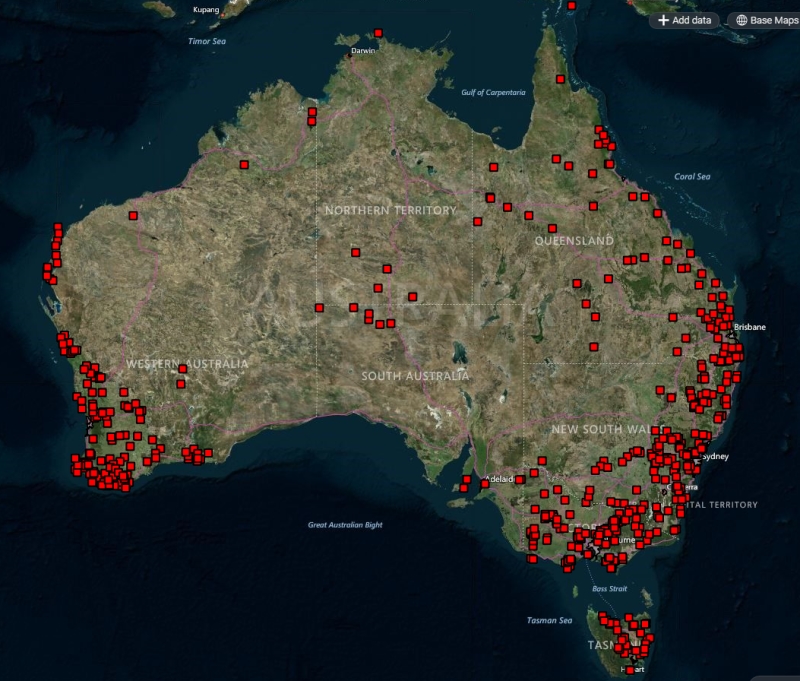
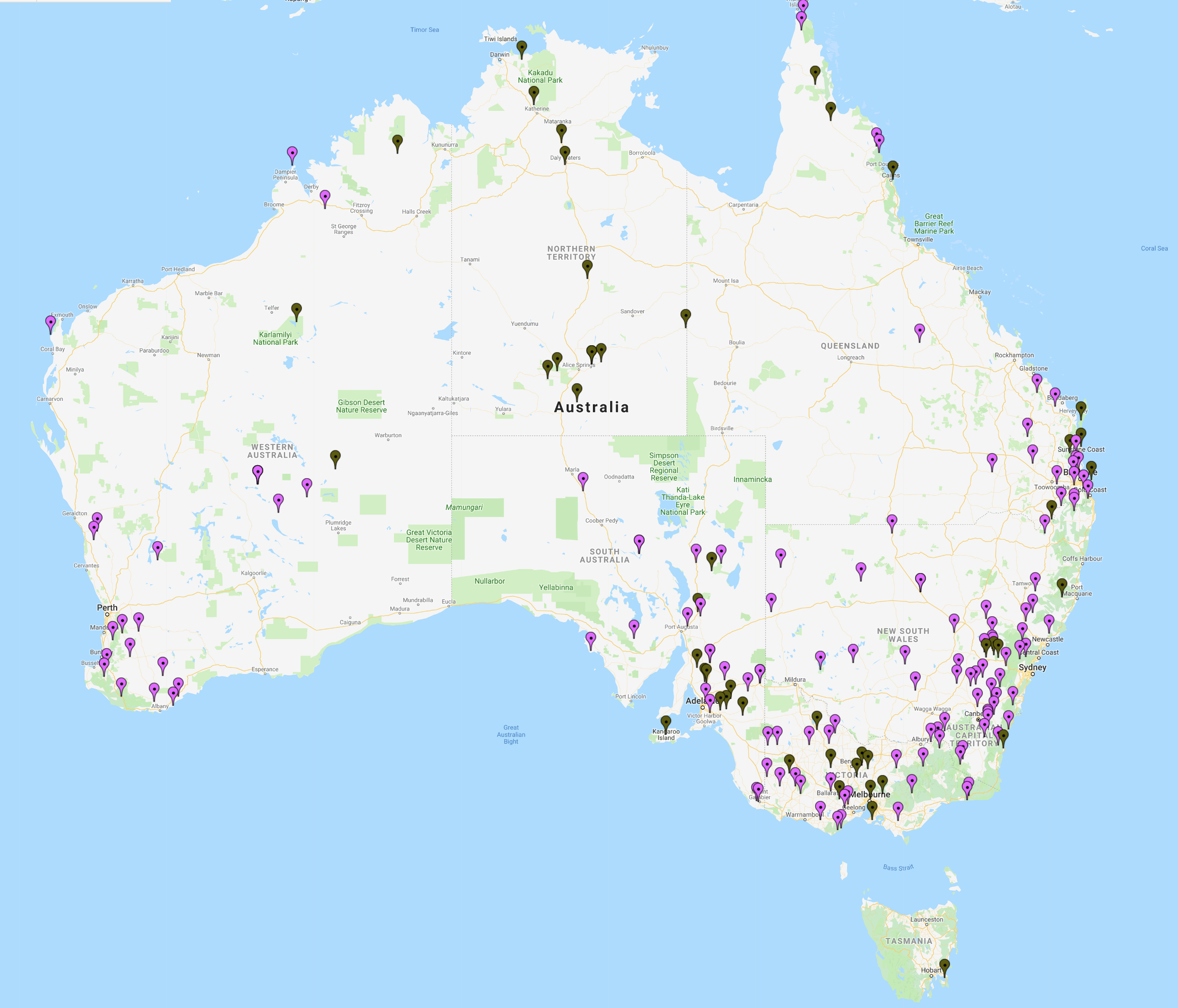
The BIRRR Map of Round 4 Locations is featured below:
Rounds 5 and 6
On 20 March 2019, the Minister for Regional Services, Senator the Hon Bridget McKenzie, announced that an additional $160 million had been allocated for Rounds 5 and 6 of the Program. Round 5 of the Program allocates $80 million in funding and the Government expects to soon release Program Guidelines for the round.
*Please note, while all care has been taken in compiling BIRRR documents, we recommend that you check with your service provider regarding your own connection issues and best plans available.
Active antennas or repeaters boost the 3G/4G signal. Repeaters such as these that require power to the unit (Telstra Smart Antennas & Nextivity Cel-Fi Repeaters) require licensing. If they are not licensed they are ILLEGAL boosters.
Illegal boosters carry a large fine as they can interfere with the mobile network.
” It is an offence under the Radiocommunications Act 1992 (the Act) to operate an unlicensed radiocommunications device, or possess this device for the purpose of operation. A person found guilty of this offence may be imprisoned for two years for each offence. A body corporate may receive a penalty of up to $270,000 (1,500 penalty units) per offence (sections 46 and 47 of the Act). Other penalties may apply, such as the interference offence provisions at Part 4.2 of the Act.” ( ACMA)
NB: Cel-Fi Pro and GO Repeaters and Telstra Branded Smart Antennas/Cel-Fi Go are the same devices, with the Telstra supplied one being different in colour, with Telstra branding.
Powertec Telecommunications are the only approved importer of the Nextivity Cel-Fi (outside of Telstra’s branded Smart Antenna). There are many resellers however, check our suppliers page for further info. The below repeaters & the Telstra branded repeaters are the ONLY licensed and legal repeaters that can be legally used in Australia.
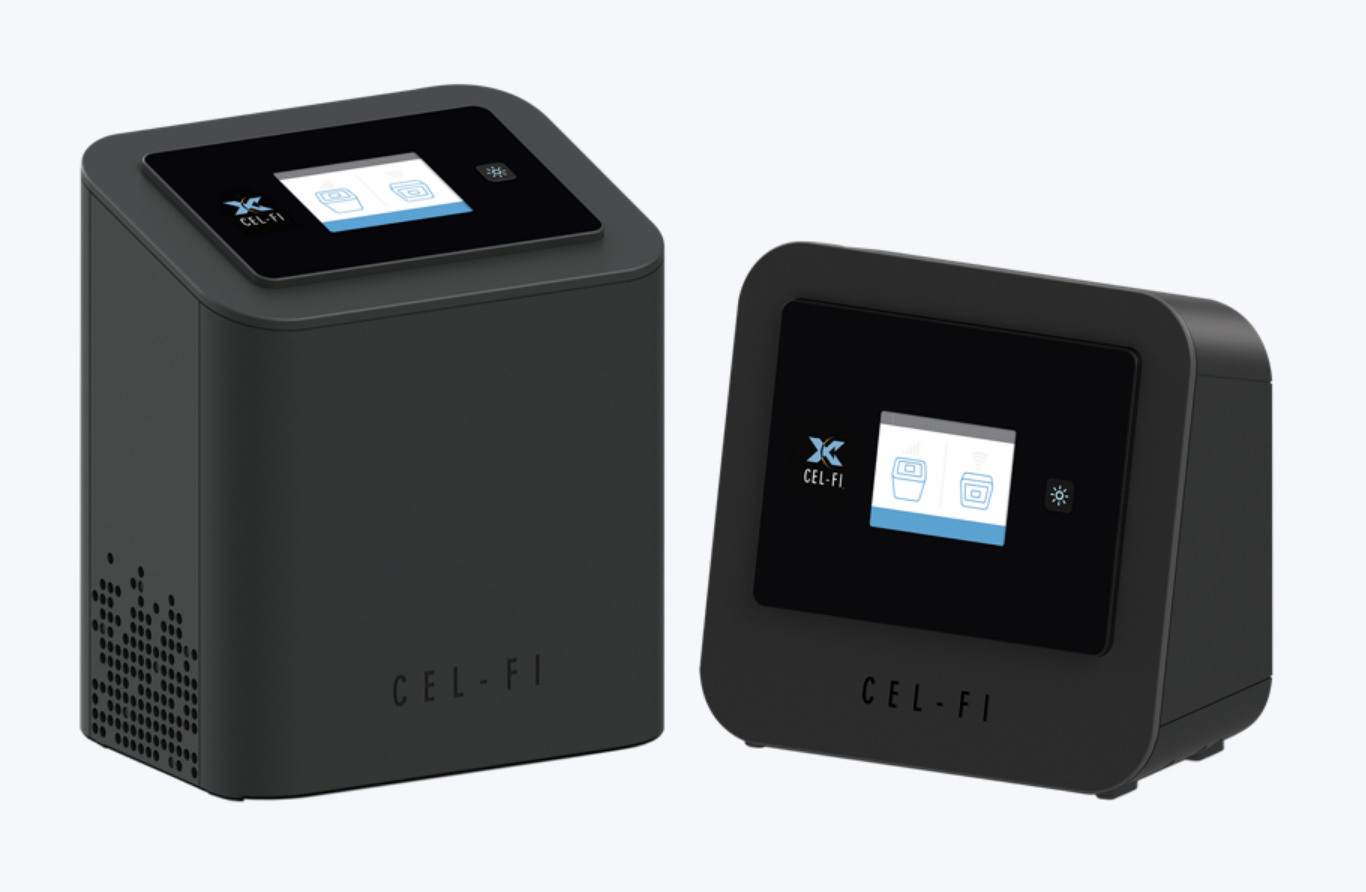
Cel-Fi pro is an indoor smart signal repeater. Available for the Telstra, Optus or Vodaphone networks.
Cel Fi Pro available for the Telstra, Optus or Vodafone Networks.
To help with setting up a Cel-Fi Pro or Smart Antenna visit the Cel-Fi page here or see the notes below. To purchase a Cel-Fi Pro in Australia, help with installation and compatible antenna advice visit Powertec
Cel-Fi Go Stationary is a smart signal repeater. Available for the Telstra, Optus or Vodaphone networks. This multi-band solution is ideal for use in commercial properties, government buildings, agricultural settings, small manufacturing operations, rural areas, businesses, and large homes. To help with setting up a Cel-Fi Go Stationary visit the Cel-Fi page here. To purchase a Cel-Fi Go Stationary in Australia, help with installation and compatible antenna advice visit Powertec
BIRRR highly recommend using surge protectors with the Cel-Fi Pro and Go Stationary devices and a UPS unit to power the repeater during general mains power failures or when the generator is off. They’re designed to power a desktop for 15 minutes or so, but are large enough to power a CelFi repeater for much longer.
The Cel-Fi GO/GO+ is a Smart Signal booster for addressing the challenge of poor cellular coverage on the road. Ideal for vehicles and boats, a suitable antenna is needed and these are recommended to be installed by a professional. To purchase a Cel-Fi Go in Australia, help with installation and compatible antenna advice visit Powertec
NB: Extension devices are carrier specific, if you require coverage across multiple carriers then you will need multiple models.
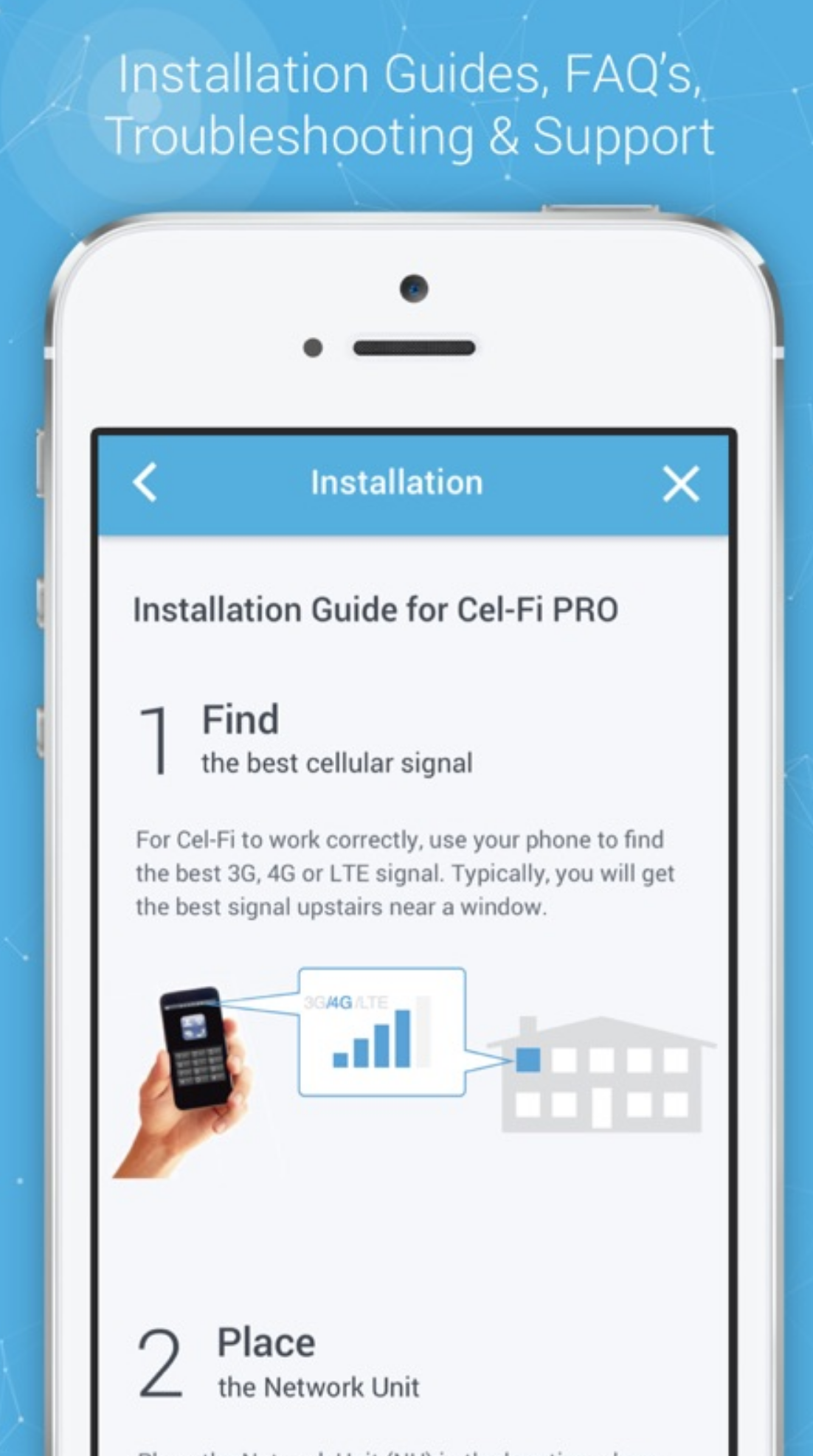
Cel-Fi Pro Installation Tips
Details on using the Wave app are available from Powertec here
Installation tips below thanks to Marcus Dowling from Rising Connection
You may like to have two very long power extension leads to help with this while you move the CU & NU around find the best locations.
Before powering up the units, walk around your property and look for both the strongest and weakest signal on you mobile. This is important, with the Cel-Fi units, if the CU (Coverage Unit/Smaller box) picks up too much signal, it will automatically back its ability off, so find the areas where you get “BAD” signal (preferably none) as options as to where you will put the CU.
(skip if not using an external antenna) Choose two locations where you are not getting good signal, if the NU (Network Unit/Bigger box) can pick up enough signal with its internal antennas, it will by default ignore the external antenna, the NU has several very decent size antennas in it, way better than any normal mobile phone has.
(skip if using an external antenna) put the NU (Network Unit/Bigger box) where you can find your strongest signal as in #1, that could be outside, just make sure the unit is protected from the weather and elements, the NU has several very decent size antennas in it, way better than any normal mobile phone has. Look to see that you are getting as many bars as possible (with the CU switched off) on the NU. The better you get the signal onto the NU, the better the CU will work in the next steps.
Performance wise the NU & CU work best at around twenty (20) meters between them, this will vary depending on your building, some could be over 40 meters, some less then 15 meters, so place the CU now away from NU progressively looking at getting the number for the NU as high as possible, then take it that bit further where it fails (to far from the NU), it is good to know how far you can push the CU. Now the distance you took the CU to where it failed, use that as a guide to bringing the CU back into range, then bring the CU back some more, the CU will be more stable close than further away, when the CU is on the fringe, it can drop out causing your mobile connection to fail intermittently.
Just using these steps often achieves better performance than the performance specifications given for the Cel-Fi.
*Please note, while all care has been taken in compiling BIRRR documents, we recommend that you check with your service provider, equipment provider and installer regarding your own connection issues and equipment needed. Please ensure that any installer is accredited and licensed and that any equipment is legal to use in Australia.
This article is a resource for people seeking information on mobile broadband services in Australia. Mobile Broadband is a different technology to NBN Fixed Wireless.
This guide covers information relating to:
mobile terminology
how to enhance mobile coverage, and other resources.
Connecting to Mobile Networks in the Rural Environment
STEP 1: Locate your local tower: to find your closest tower using the following link:
The following online guides are recommended for a step by step process to finding towers near you. The two guides below each take a slightly different approach at some steps, so read both and work out what works best for you.
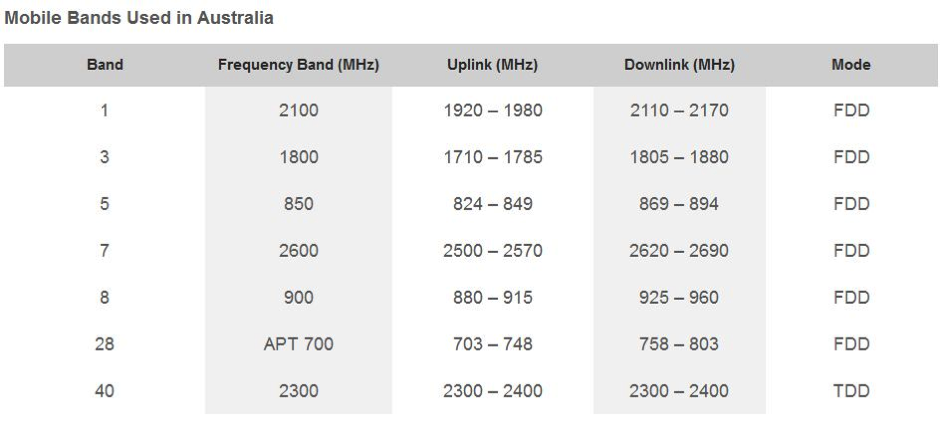
The carrier bandwidth is the single greatest determinate of how fast the mobile data service may operate. There are other factors such as signal strength, Carrier Aggregation and frequency of operation that also affect the speed of service and the distance that the service may be available from the tower.
The above businesses can then put you in touch with a specialist in your area who understands the requirements for your state. The report will advise likely signal levels, the sort of mobile services available, the best antenna and extension device for your location and where to point your antenna.
Telco Antennasalso provide information on antenna and network extension specialists throughout Australia. Please contact them directly for advice on equipment and installers.
What is Legal ?
If you can get some mobile coverage at your location, a network extension device may assist you in boosting your signal.
Passive antennas are usually mounted on the roof (e.g. yagi antennas) and do not require licensing.
Active antennas such as the Celfi’s and Smart Antennas (that require power) do require licensing. If they are not licensed they are ILLEGAL boosters.
Illegal boosters carry a large fine as they can interfere with the mobile network.
” It is an offence under the Radiocommunications Act 1992 (the Act) to operate an unlicensed radiocommunications device, or possess this device for the purpose of operation. A person found guilty of this offence may be imprisoned for two years for each offence. A body corporate may receive a penalty of up to $270,000 (1,500 penalty units) per offence (sections 46 and 47 of the Act). Other penalties may apply, such as the interference offence provisions at Part 4.2 of the Act.” ( ACMA)
How to extend a mobile data service from a mobile reception location (hill etc) to home
A solar transponder or a mobile data relay may be installed to relay internet from a mobile friendly location on your property back to your home. Here is one DIY example
*Please note, while all care has been taken in compiling BIRRR documents, we recommend that you check with your equipment supplier, installer and service provider regarding your own connection issues and equipment needed. Please ensure that your installer is accredited and licensed and all equipment used is legal to use in Australia.
Some Providers are offering what is referred to un-metered data, this means that any data you use will not be counted against your actual data allowance. While no unmetered access is offered on satellite connections, some ISPs like SkyMesh, iiNet, Optus and Telstra (Bigpond) offer certain services that are not counted as part of your data allowance.
These are some common questions and answers:
What ISPs offer Unmetered services?
Skymesh (for NBN Fixed Wireless and NBN Fibre – Netflix content delivered over Australian peering links will not be counted against your data allowance. You have to be an Australian Netflix subscriber)
The Freezone offers a range of video and radio content for iiNet, Westnet, Netspace, Internode and Adam Internet customers to enjoy without taking a hit to their monthly quota. Everything from movies, music, sports and gaming content is available along with several live streamed events throughout the year.
Skymesh, iiNet and Internode offer unmetered access to Netflix in Australia on Fixed Line NBN and Fixed Wireless NBN. In the Case of iiNet and Internode this is also offered on standard ADSL bundles (Not Naked DSL connections). Netflix works on a per month subscription payment.
Telstra offers unmetered access to Presto and a variety of services, detailed in the link above, on Bigpond Wireless Broadband, Telstra Home Broadband (including NBN FTTX and ADSL). Presto works on a per month subscription payment.
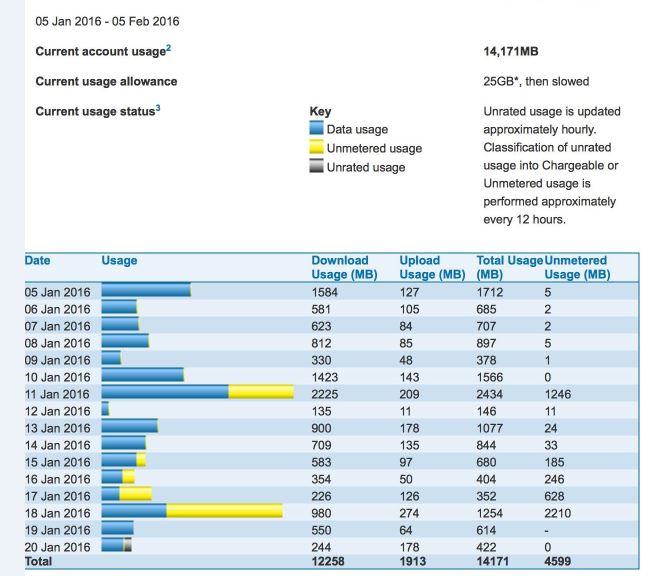
Presto unmetering shown in yellow on a Bigpond Usage Chart
NB: Whenever you see the BigPond Unmetered icon (green dot), download as much as you like and it won’t count towards your monthly usage limit. Please note that the Green Dot may not be on all pages,
Telstra/Bigpond also offer unmetered access to some distance education sites and Portals:
A letter written to ICPA Federal (Isolated Parent’s Childrens’ Association) from Telstra Country Wide re unmetering education websites used by distance education students.
Telstra is committed to listen, learn and respond as positively as possible to issues raised by the ICPA. In this day and age, the internet is a vital source for students and in a country the size of Australia, there are geographical, capacity and commercial realities why it’s not possible to provide the full range of broadband services in some regional and remote locations. What we can do is help families better manage their broadband allowances. From 1 September 2015, Telstra will be un-metering a number of key Education websites for all BigPond and Telstra Mobile Broadband users.
This is on top of the 21 sites that are already unmetered. This was in response to a motion made at last year’s conference and following a visit by Andrew Coull and the Telstra Country Wide team to the Alpha region in Queensland where ICPA members and local families talked about what was most important to them.
To address one of the challenges regional and remote communities face in order to provide children with the best possible tools and support to further their education, Telstra is adding value to their broadband allowance through the un-metering of educational websites. These sites were identified with the ICPA and relevant Departments of Education. We may change sites from unmetered to metered at any time. Of course, as these are new unmetered sites, we don’t expect to make changes anytime soon.
Unmetering Terms & Conditions On and from 1 September 2015 unless otherwise advised, a number of key education websites will be unmetered. Some of the key sites include: Queensland Department of Education and Training (e.g. det.qld.gov.au, education.qld.gov.au)* WA Department of Education and Training (e.g. http://det.wa.edu.au/*) SA Department for Education & Child Development (www.centra.sa.edu.au) Creative Generation (www.creativegeneration.deta.qld.gov.au) Scootle Community (https://www.scootle.edu.au) Moodle (http://Moodle.openaccess.edu.au) When accessing these sites, Telstra Mobile Broadband users, as well as BigPond Broadband Members on ADSL, Cable or Mobile Broadband plans (excluding hourly plans), can access downloads, video streams and editorial content without affecting their monthly usage limit. Note that the un-metering does not apply to Telstra Satellite users.
Please note that unmetering won’t apply if you’re accessing the internet using International Roaming. Additionally, some elements of an unmetered site may be metered if they are sourced from other websites that are metered, including things such as advertisements, YouTube videos, Google maps or social media services. Every time you visit or refresh a page you will incur the download of that content.
Kind regards Libby Dalton Executive Officer | Telstra Country Wide
Note: BIRRR have been working with Telstra Country Wide to ensure elearn and iconnect are included on the unmetering list for QLD distance education students. As of 4th term 2015 these sites were unmetered however changes have been made in early 2016, if QLD families find themselves ‘shaped’ whilst these sites are being worked through please contact BIRRR ~ birrraus@gmail.com For further information contact the department of education in your state.
UPDATED February 2016
These sites were identified in consultation with the ICPA and a number of Departments of Education. We will continue to monitor and refine the websites included and make changes from unmetered to metered as appropriate.
It’s very simple, assume you have a Telstra Bigpond wireless plan with 4GB of data. You browse to Presto.com.au and start watching a whole heap of movies to the amount of 10GB, and then you browse to say youtube.com and use 3GB of data on Videos.
Telstra will calculate your actual usage to be:
3000mb (3gb) of 4gb used (while viewing YouTube) +
10gb of unmetered content (while viewing Presto) for a total of
13gb used but only billed for 3gb, leaving with 1gb of metered data for the rest of the month.
Once you use that 1gb of data, then your service will be slowed down (shaped) to 64kbps which is as fast as dial-up. Unmetered content will also unfortunately be shaped.
Remember with bigpond you are free to change plans once a month to reflect your usage habits. However the highest plan currently available is 25GB.
Why Not satellite services as well?
Unfortunately, the cost of providing a satellite service to a consumer or business, added in the limited amount of backhaul (backhaul is like a very heavy freight train, the more locomotives at the front the more wagons it can pull) available, means it is not affordable to provide this service.
*Please note, while all care has been taken in compiling BIRRR documents, we recommend that you check with your ISP regarding unmetering. As the #datadrought mainly impacts mobile broadband and satellite customers we have focussed on unmetering for these technologies. Your provider may have other sites that are unmetered. Thanks to BIRRR members Julie Stott & Kye Rosendale for assistance in compiling this document.
If you need to contact Telstra please ring the correct department, it will result in quicker problem solving. Get to know your plan, look on your bill are you a business or residential customer?
Telstra Country Wide have a dedicated website for rural, regional & remote users.
TELSTRA FAULTS
Phone: 13 2200 for Residential, 13 2000 for Business for faults, antennas, equipment and plans etc (for all faults other than RRADIO & NGWL faults – see below).
Radio Phones & NGWL Services 1800 772 346 (1800 R RADIO) or 1800 696 495 (1800 MYNGWL), for customers using radio and NGWL services to report service difficulties or faults. There is also a dedicated email address (rradio@team.telstra.com) for online fault reporting.
Mobile Assurance Team Mobile Assurance provides support to Pre-Paid, Consumer, Telstra Business and Telstra Enterprise & Government customers. They operate 24/7, and assist customers who are experiencing mobile and wireless service difficulties and faults.
Consumer customers: 13 2200
Business customers: 13 2000
Footnote:
All information compiled from BIRRR discussions with Telstra and Telstra website and is current as at 01/09/2020
TELSTRA Contacts DOCUMENT prepared by Kristy Sparrow for BIRRR
If you can get some Telstra mobile coverage at your location a Telstra Extension Device may assist you in boosting your signal.
Network coverage extension devices amplify the network signal your mobile device receives, which extends the area that your device can work in.
This devices can help you connect to the Telstra Mobile Network from further away than normally possible, or in areas where signal may struggle to penetrate – such as indoors, or in hilly or dense terrain.
Mobile broadband network coverage extension devices are also known as ‘repeaters’ as they repeat the signal from one location to another.
In contrast, network coverage extension devices that connect directly to a mobile device are often called external antennas. They are described by their power or ‘gain’, which is a measure of how much they can amplify the mobile signal.
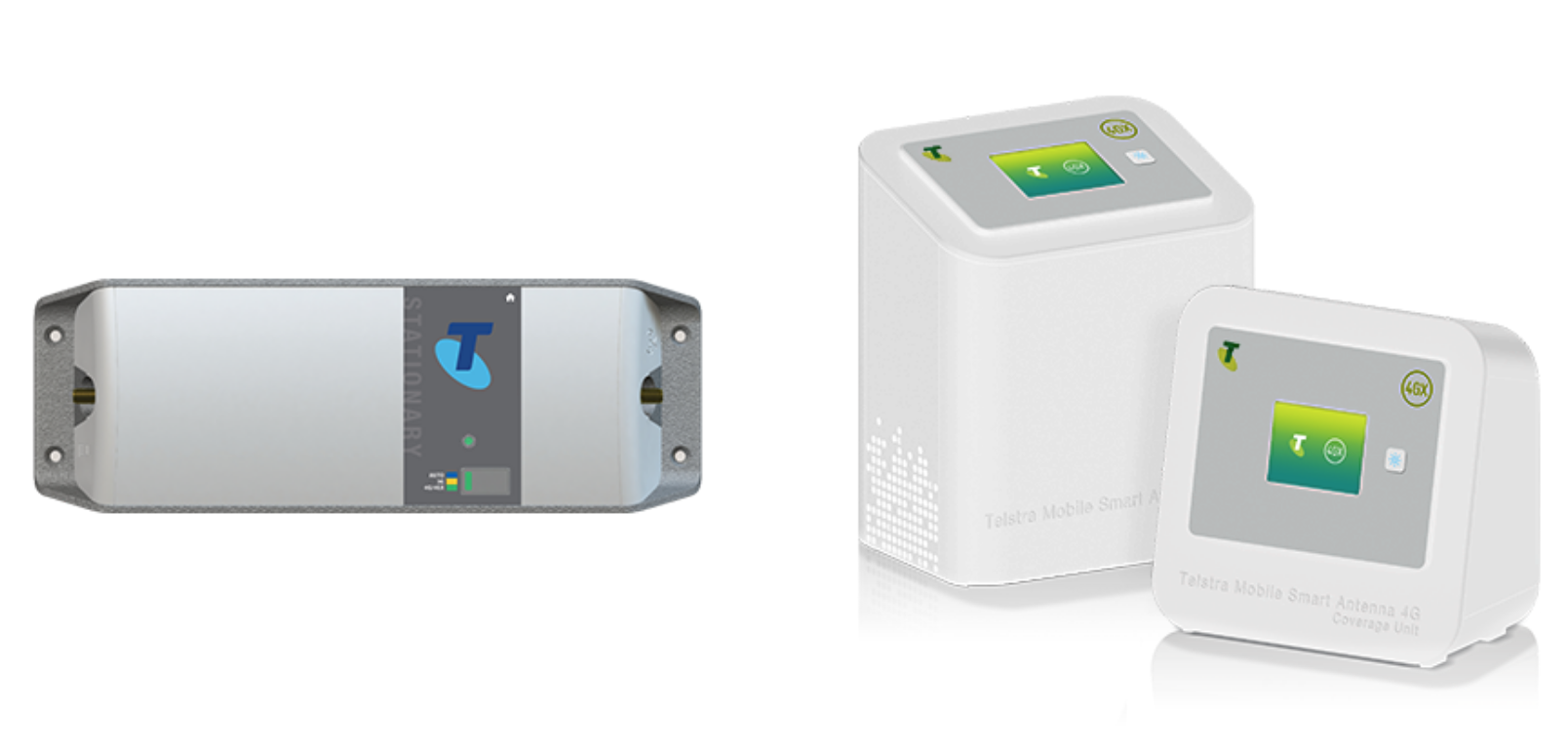
Both of the Telstra Go Repeater and Telstra Smart Antenna products below have been tested, authorised and approved by Telstra for use on the Telstra Mobile Network.
Telstra will be switching off 3G in 2024. With this in mind BIRRR does not recommend spending large amounts of money on boosting 3G service. 3G is being replaced with 4G (if spending any money on antennas or repeating equipment please ensure these are 4G compatible) and also be aware that boosting 3G service may not deliver faster speeds or reliability.
NB: Extension devices are carrier specific, if you require coverage across multiple carriers then you will need multiple models. This page lists only Telstra branded extension devices.
Telstra Network Coverage Devices:
This slideshow requires JavaScript.
Telstra Smart Antenna RRP $1080
Telstra Go Smart Vehicle Mobile Repeater RRP $864
Telstra Go Stationary Repeater RRP $816
*Professional installation may require additional charges. Prices correct as of 1st August 2020.
BIRRR highly recommend using surge protectors with these devices and a UPS unit to power the repeater during general mains power failures or when the generator is off. They’re designed to power a desktop for 15 minutes or so, but are large enough to power a CelFi repeater for much longer.
** After 3G switch off these devices will continue to operate but only with 4G (700 MHz, 1800 MHz).
Telstra Recommended Antennas:
This slideshow requires JavaScript.
For further information on Telstra recommended extension devices or to have them professionally installed contact the Telstra Mobile Assurances Team:
Contact the Telstra Regional Australia Team if you require help with coverage at your address and to check your options for mobile extension devices.
The above information has been provided by discussions with Telstra, other service providers also offer solutions for boosting signal strength, please be aware that these must be registered devices. It is best to contact your service provider directly. Illegal boosters carry a large fine as they can interfere with the mobile network.
” It is an offence under the Radiocommunications Act 1992 (the Act) to operate an unlicensed radiocommunications device, or possess this device for the purpose of operation. A person found guilty of this offence may be imprisoned for two years for each offence. A body corporate may receive a penalty of up to $270,000 (1,500 penalty units) per offence (sections 46 and 47 of the Act). Other penalties may apply, such as the interference offence provisions at Part 4.2 of the Act.” ( ACMA)
REPORT A PROHIBITED DEVICE ~ If you are aware of anyone having these prohibited devices, you can:
call the ACMA’s customer service centre on 1300 850 115















 150GB $67.50/mth (includes modem) – 12 month contract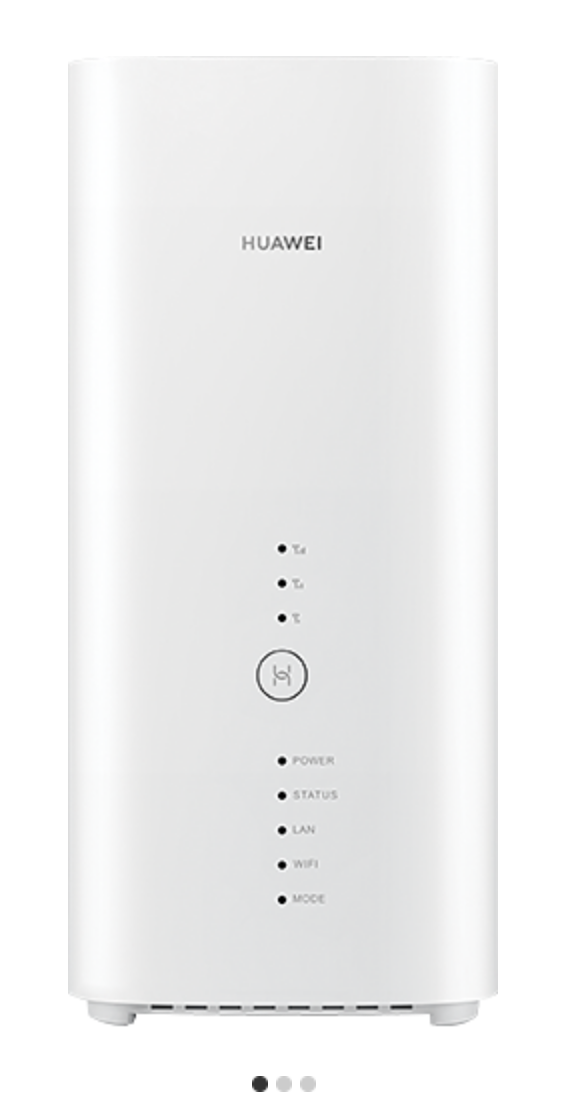










 Better Internet for Rural, Regional & Remote Australia (BIRRR)