Finding SkyMuster

How to find the location of Sky Muster relative to your place

  1. Go to http://www.dishpointer.com/
  2. Sky Muster is not yet listed on DishPointer, so use a satellite that is just next door ie Express-AM5 at 140E.
  3. Enter your location zoom in or out and drag the green marker to the likely dish location.
  4. Tick the ‘show obstacle’ box and move the ‘red marker’ to any obstacle that is in line, to determine if there is any impact of the obstacle on a clear line of sight to the satellite.

Satellite Finder

*Please note, while all care has been taken in compiling BIRRR documents, we recommend that you check with your service provider regarding your own connection issues.

Kindly prepared and illustrated for BIRRR by John Kitchener 25/5/2016

How to use your off-peak data

This article is particularly helpful for nbn Sky Muster Satellite customers. 

SKYMUSTER hours (regardless of your provider) will be:

PEAK: 7am – 1am and OFF-PEAK: 1am to 7am

Wondering how to best utilise your off peak data?

Here are some ways to get the most out of your satellite plans.

Mac Systems: You need to perform a few simple tasks to prepare for scheduled downloads. First, go to System Preferences > Energy Saver and press the Schedule button. Check the Start up or wake check box and select the time for your Mac to wake. You want it to wake at least 1 minute before your Calendar event will fire, to ensure that you are connected to the Internet. Once you have set the wake day and time, click OK and close the Energy Saver window.

OPERATING SYSTEM SOFTWARE:

Operating system updates for Windows 10 and Apple iOS are AUTOMATIC, you cannot schedule them. Earlier versions of Windows can be scheduled.

How to Schedule Windows 10 PRO UPDATES

RECORDING PROGRAMS

Playon 

PlayOn is a program that allows you to record movies and TV shows during off peak times. You can record streaming video from over 100 popular streaming sites including Netflix. Recordings are saved as .MP4 video files which can be easily transferred to an iPad or iPhone via iTunes, or to an Android mobile device. Cost is $2.50US a month. WINDOWS Compatible Only

Playon Cloud

  • Is compatible with both Windows computers and Apple devices. More information about PlayOn Cloud is here. 
  • PlayOn Cloud is a mobile app that can be used to record and then download video files during off peak times.  This is useful for those on satellite connections (who usually have unused off peak data), those who are experiencing network congestion, slow equipment and those wanting to download movies and clips for times when you need to watch offline e.g plane trips and travel.

SCHEDULING ITUNES DOWNLOADS

MAC Users: The following link shows you how to schedule downloads (apps, music, movies, TV shows etc) in off peak times in itunes using a Mac CLICK HERE  You can also use this method to update apps in off peak times and then connect your i-device to the computer / itunes and update on your device or transfer downloads without using data.

DROPBOX SYNCING

Use the following links to sync your dropbox files at night during off peak times.

MOBILE DEVICES SOFTWARE UPDATES

APPLE: Apple iOS are only automatic if you are connected via WiFi or cable. If the device is Cellular only, it is NOT automatic, and can be scheduled but therefore can’t use your Sky Muster off peak data for these updates.

DOWNLOAD SCHEDULERS

Install a DOWNLOAD SCHEDULER to your computer that allows large file downloads to be scheduled during off peak hours. They work by adding a link to the file you want downloaded and then scheduling this download.  Some recommended download schedulers are:

Once you have installed the download scheduler application you can choose the time/day you wish to download the file(s).

WARNING: Please be careful with download manager add-ons, some have been known to be malicious and deliberately spam users or Hijack user’s computers.

Do not click on any pop ups, links, ads or programs that promise to speed up your computer or internet connection – these often contain malicious software. These links or ads are especially common on popular speed testing websites.

SCHEDULE EMAILS

GMAIL SCHEDULER DOWNLOAD

Email Scheduler for Gmail lets you schedule email messages inside Gmail with the help of a Google Spreadsheet. You can write your messages now and Gmail will send them later at your specified date and time, thus you can schedule it to use your off peak data. The scheduler can also send recurring emails that go out automatically on daily, weekly, monthly or yearly repetitive schedule.

MICROSOFT OUTLOOK SCHEDULER

Microsoft Outlook can also schedule delivery (and reception) of email messages.

*Please note, while all care has been taken in compiling BIRRR documents, we recommend that you check with your ISP regarding off peak data if you have any concerns.  As the #datadrought mainly impacts satellite customers with off peak data we have focussed on off peak data for these customers.   Thanks to BIRRR members  Julie Stott & Kye Rosendale for assistance in compiling this document.  

Sky Muster Routers

BIRRR recommends that customers use the router offered by their provider; as this ensures ongoing support for both the service and your local network.

Now is an ideal time and opportunity to discuss your evolving network needs with both your RSP and/ or trusted technical advisor.

Before making changes, always talk to your provider and follow their advice.

Your RSP will assist with any troubleshooting of the new Sky Muster connection. This support will work best if you are using the router models that they provide.

Common Questions:

Will my old router work on SKY MUSTER?

Your existing WIFI router may be fine for Sky Muster; as long as it has a WAN port that provides Dynamic Host Configuration Protocol (DHCP). Note: 99% of ADSL routers are unsuitable for any nbn service.

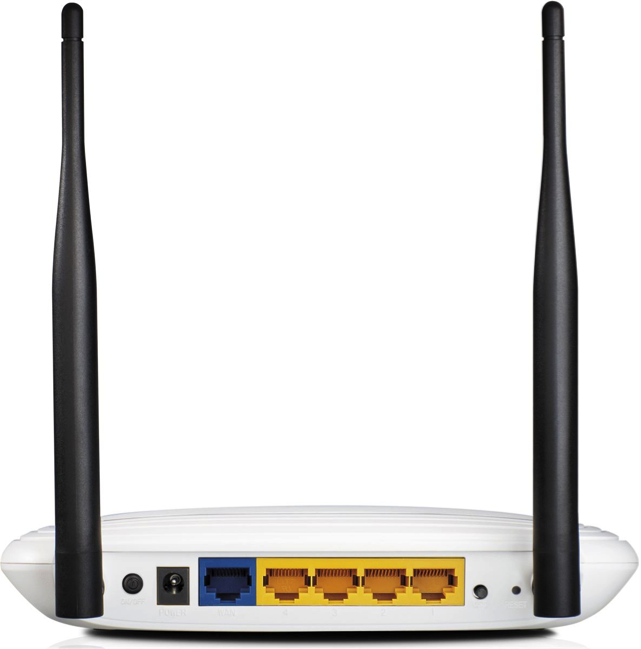
If your existing WIFI router is less than 5-6 years old, 300n WIFI (minimum), has a WAN port (blue) and a 1-4 10/100Mbps LAN ports (yellow); it should work on your Sky Muster service. It may look something like this:

SM8
A typical 300n 10/100 4 LAN port router


Even older 802.11g routers which first arrived in 2003, will work, although they may be slower.

Should I upgrade my current router?

It may be worthwhile upgrading your current router if it is old. Current routers can offer more features that may better serve your network requirements. (Discuss this with your RSP in conjunction with your trusted technical advisor). However, a new model router is unlikely to speed up your connection, unless your existing router is too old, faulty or poorly configured.

New model routers also offer improved WIFI and may support both 2.4Ghz and 5Ghz WIFI bands. It is worth noting that 2.4Ghz generally provides better and wider coverage in a large home. If you ‘do a lot’ with your home network e.g it is connected to many devices, includes a media server and/or fast hard drives, printer(s), scanners etc; a newer router will speed up WIFI connections and data transfers within the network.

Newer routers may offer faster LAN ports (1,000Mbps) and USB ports(s) that may support a USB printer and or a hard drive. These devices may then be accessed by anyone on the network. Refer to the router manufacturer website for specifications for further information.

Any new router from your RSP or shop, will be supplied with a suitable Ethernet cable to connect the nbn NTD to your WIFI router.

Do I have to get a router?

If you want to connect more than one computer to your Sky Muster installation you will need WiFi and therefore you will need a router.

If you would prefer to LAN connect your devices (rather than WIFI), you can install a switch to accommodate the extra LAN ports. Your technical advisor can provide further information.

Is there a router that can help me manage my data usage?

It may be useful to install Gargoyle on your router. Gargoyle is a free router firmware that can be installed on certain routers. Gargoyle provides tools to both measure and conserve your precious monthly Sky Muster plan quota. It may sound complicated, but if you can perform a firmware upgrade on a router, you can install and run Gargoyle.

What router should I get?

Some providers configure their supplied routers before sending to the customer.  This means they are ‘Plug and Play’ and use the DHCP protocol.  Other Sky Muster providers use PPPOE protocol which means you will need to set up your router.  You would need to have a username and password with PPPOE, while the configuration of DHCP is automatic.

DHCP = Dynamic Host Configuration Protocol

PPPOE = Point-to-Point Protocol over Ethernet

Sky Muster™ RSP Router offers – August 2018

The following router information is provided by best endeavour.
Please confirm details with your RSP

SkyMuster Routers25May

  1. VoIP (Voice calls over the Internet) may be provided by the addition of an RSP provided Analogue Telephone Adapter (ATA). This is additional equipment, or a VoIP Compatible Router.
  2. NOTE: Some providers offer free or discounted routers, if customers sign up to a 12 or 24 month contract.
  3. Please refer to the Router Manufacturer for further specifics and information on the Router Capabilities.

300n (or 802.11n) are base model single WIFI band 2.4Ghz routers.

AC (or 802.11ac) provide faster WIFI speeds. The higher the ‘AC No.‘ the faster the router. It will likely have more user features.

Links to RSP router offerings and Manufacturer websites

D-Link

NETGEAR

TP-LINK


Typical Router Setup

S-NTD Router cable connections

NOTE:  The LAN cable (yellow here, can be other colours)  generally goes from UNI-D 1 on your Sky Muster Modem (NTD)  to the WAN input on the router (usually the yellow socket).

*Please note, while all care has been taken in compiling BIRRR documents, we recommend that you check with your service provider regarding your own connection issues. Updated 29/8/18


MEDIA RELEASE: ‘GETTING LEFT BEHIND’ (Survey results)

MEDIA RELEASE:  ‘GETTING LEFT BEHIND’
Internet Survey unearths critical need for widespread changes to combat #DataDrought

The Better Internet for Rural, Regional and Remote Australia (BIRRR) Regional Internet Access Survey, released this week, has revealed critical problems with Australia’s current internet options, and warns of long-term consequences if changes are not urgently made.

The survey, distributed through the BIRRR Facebook group, investigates current consumer conditions for people in rural, regional and remote areas of Australia using the internet.

The in-depth report found that rural, regional and remote people are severely disadvantaged in terms of access, speeds, cost and reliability of their internet connections, whether they be via mobile broadband or via satellite.

These issues have had (and continue to have) a dramatic effect on rural, regional and remote peoples business, the education of their children and themselves, and on their personal well-being.

It also illustrates the notion – even with the onset of NBN’s Skymuster – that data growth will soon outgrow the nbn Fair Use Policy that will see 75GB/month peak use data limits on customers.

Among the statistics revealed from this survey:

Internet in RRR Australia is mainly used for business (Fig 2, p 8)
88% of RRR respondents stated current data did not meet their needs (Fig 5, p10)
Mobile Broadband costs those surveyed an average of $9.27 per GB, with some consumers paying up to $20 per GB. (p18)
Satellite broadband costs an average of $15.96 per GB, with some consumers paying up to $70 per GB (Table 20, p 28)
63% of respondents are shaped more than 6 times per year, with over 40% being shaped every single month. (Table 11 p 19 for mobile, Table 23, p 29 for satellite)
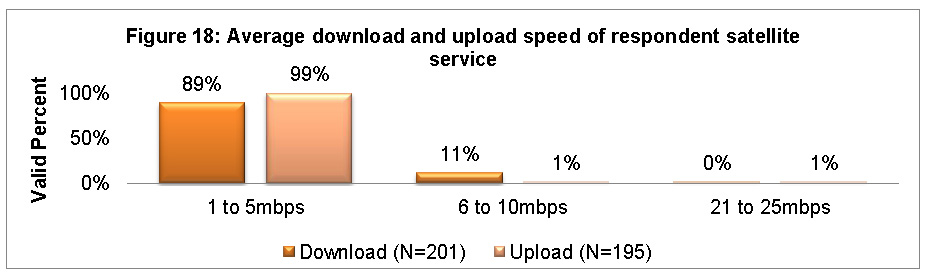
74% of mobile broadband users (Fig 11, p21) and 89% of satellite users (Fig 18, p 30) have download speeds under 5Mbps
72% of mobile broadband users had to purchase extra equipment at their own cost, usually between $1000 – $2000 (Fig 20, p33)
73 % respondents do not have reliable mobile coverage (Fig 20, p33)
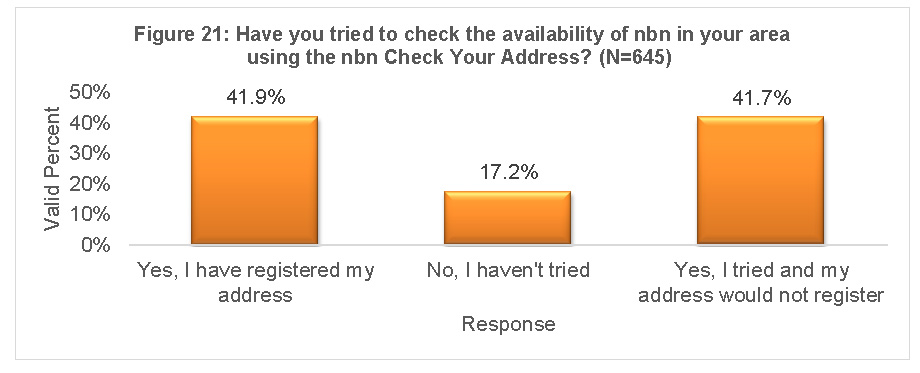
41% said their address would not register on the NBN database. (Fig 21, p 35)
65% of people not confident that they are aware of their nbn options (Fig 23, page 40)
92% gave a score of six or above indicating that they would recommend the BIRRR to friends and family (Fig 24, p 41)

BIRRR founder and admin Kristy Sparrow said the results reinforce the need for an independent telecommunications advisory body to help guide consumers through the bush broadband ‘jungle of options and answers’, along with an established universal service guarantee for regional Australians.

“There needs to be an established service guarantee for internet services Australia wide. Service for regional, rural and remote customers should be equitable in terms of speed, download capabilities and costs.

“If this does not occur regional Australia will be left (even further) behind.”

The survey was conducted up to the end of January 2016, and reflects the incredible frustrations endured by those living and using internet beyond Australia’s city limits.

“There is little doubt that the world is becoming more and more centred around the internet – from business accounting clouds to online education courses and distance education, from virtual medical consultations to emergency contact points, from the latest app developments for farming ventures and simple tools of communication, it’s all happening online.

“Internet access is no longer an ‘option’ – it’s an essential part of everyday life.” (Internet access was declared a basic human right by United Nations in 2011.)

The BIRRR survey reflects also community concerns about accommodating the growth of data use.

“People are clearly worried that as more and more activities become data hungry, current and proposed plans will be unable to handle the extra load. We already know data use growth is a continuing upward trend: The Australian Bureau of Statistics (ABS) reports the average broadband downloads grew more than 33 per cent from December 2013 to December 2014.”

This same ABS report showed that, on average, each Australian household has eight Internet connected devices – already many bush connections cannot support that load, and there is increasing concern that data limits announced for SkyMuster by nbn will simply not be sufficient into the future.

“Currently internet connectivity does not meet the educational, business, health & welfare needs of regional Australians. Peak Data of 75GB on NBN satellite will not future proof Australia’s data needs. Nor will it end the #datadrought. The Long Term Satellite is not a long term solution for rural, regional and remote users of the internet. “

Another major ‘sticking point’ are off-peak periods to be enforced via Skymuster.

“With much of the data available on plans currently being offered to customers looking to use SkyMuster only accessible between 1am and 7am, it is simply not ‘user friendly’,” Mrs Sparrow said.

“This survey illustrates clearly that regional Australians are frustrated with their current set-ups and not confident about long-term ‘fixes’ such as the Skymuster satellite (LTSS).”

Full survey findings here: 2016 BIRRR SURVEY RESULTS
For further information: birrraus@gmail.com


Following: illustrations from the 2016 BIRRR survey report
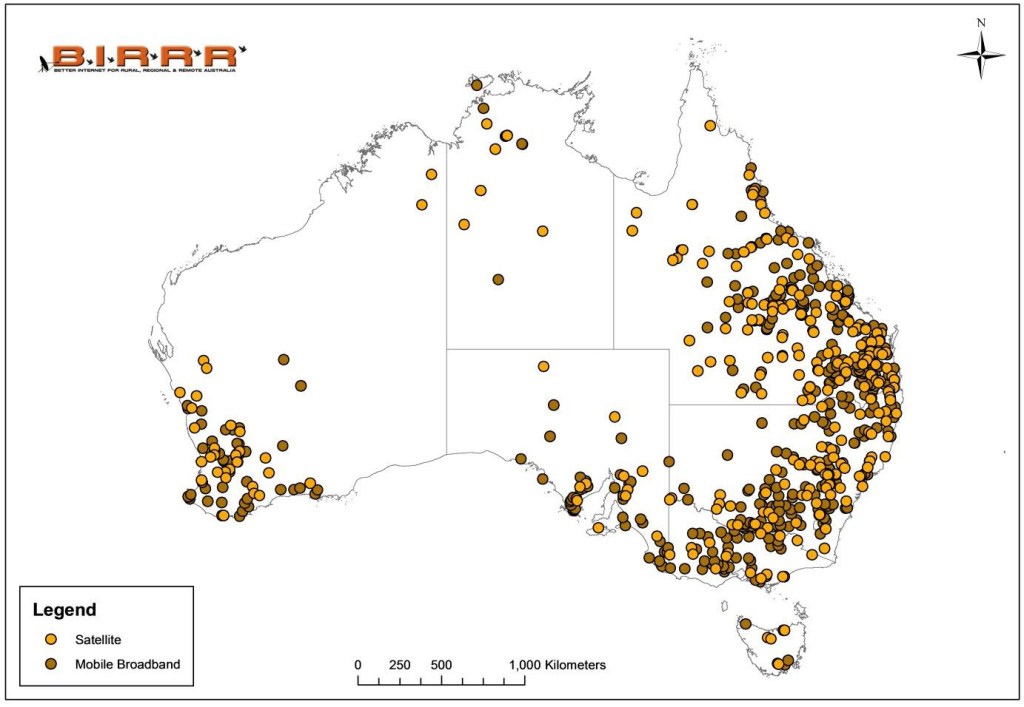
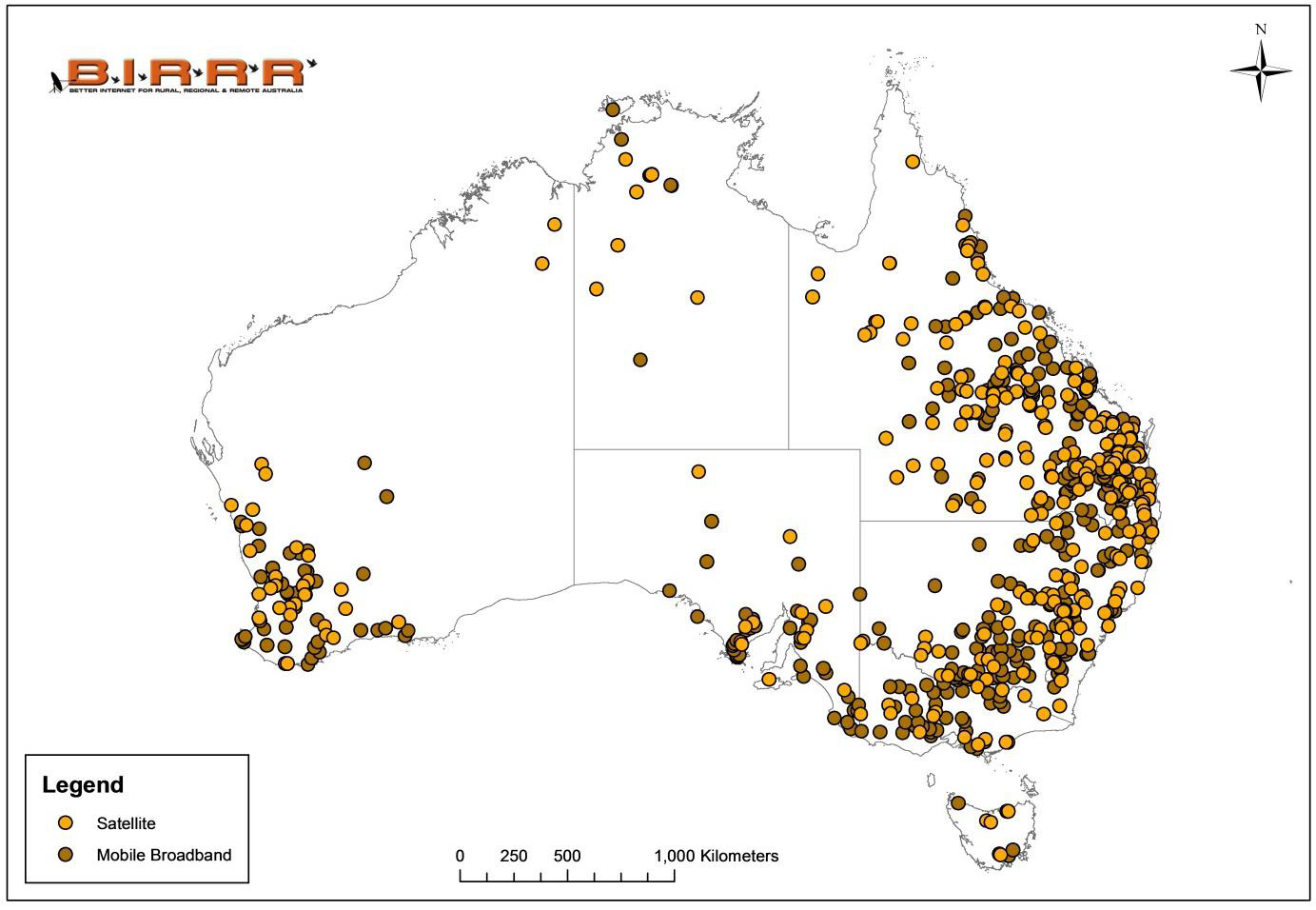
  data survey map

Respondents came from right around Australia.

meeting needs image

Overwhelmingly, current services do not meet needs.

mobile download upload speeds

sat upload download speeds

cost to access mobile service

nbn addressing issues

Among the many hurdles – registering to find out nbn availability!
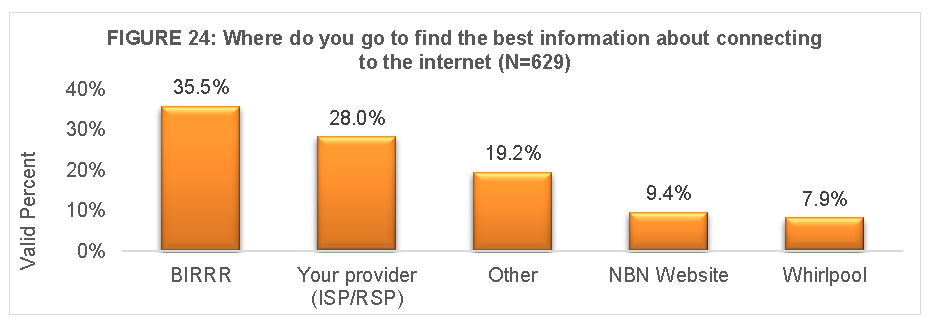
birrr preferred info

Figure 24: Reinforcing the need for an independent telecommunications advisory body to help guide consumers through the bush broadband ‘jungle of options and answers’.

A very special thanks to Rachel Hay, PhD Student & Sessional Lecturer, James Cook University, Townsville, for compiling and analysing survey data for this report.

BIRRR survey SAYS…

2017

Link to survey – 2017 Regional Internet Access Survey Results

2016

Announcing the release of the 2016 SURVEY RESULTS for REGIONAL INTERNET ACCESS!!!

survey image

LINK TO MEDIA RELEASE: ‘GETTING LEFT BEHIND’

Please use the following links to download the PDF’s of the results document (52 pages/1.9MB) and our media release (4 pages/1MB)

2016 Regional Internet Access Survey Results

BIRRR ‘SURVEY SAYS’ MEDIA RELEASE