Are you experiencing dropouts or slow speeds with your internet connection ? The following programs/devices can assist you in monitoring your connection and provide valuable data for you to escalate with your RSP (provider).
PING PLOTTER
Ping Plotter is a great program that can record the dropouts for you, so you don’t have to manually record these for your provider. The program can also measure things such as packet loss, jitter and trace route. Whilst a test device that is plugged directly into your internet connection (LAN cable) is ideal, a Wi-Fi connection is also fine as long as the test device has a strong Wi-Fi signal. The device must also remain active for the period of the test.
NB: If you are troubleshooting with a nbn provider you must use Ping Plotter with a device that is directly connected into the nbn connection box (NTD/modem) via an ethernet cord/LAN cable.
For nbn Sky Muster connections: Adjust the expected latency to be 550-800ms
2. SAM KNOWS MONITORING WHITEBOX
The Australian Competition and Consumer Commission (ACCC) has launched the Measuring Broadband Australia program in order to better understand how Australians are experiencing internet performance in their homes. The program uses Sam Knows White boxes to record information about the quality of your connection, such as speed, packet loss, latency and drop outs. To sign up for a Sam Knows monitor via this link (please note satellite connections are not eligible). https://measuringbroadbandaustralia.com.au/
3. SPEEDTEST.NET
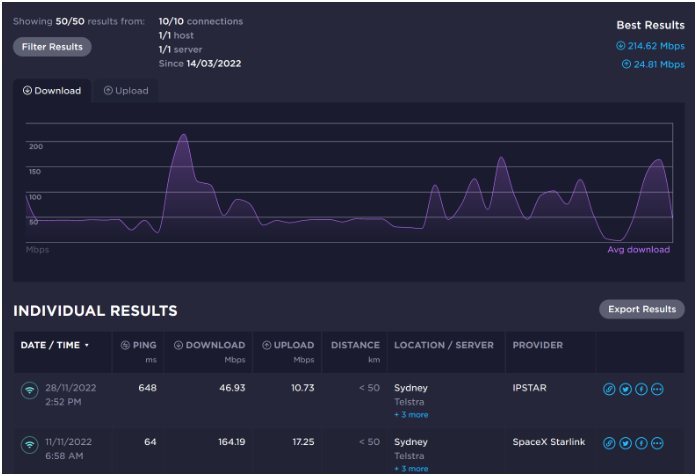
USE Speedtest.net to chart your speed results over time. Create an account and sign in to Speedtest.net to get started. Do several tests in the evening busy period and several tests at a less busy time
4. NetUptime Monitor
Continuously monitor your internet and local network connections in real time and view or print a detailed log of all failure length and times. Only compatible with windows computers.
NB: When setting up the monitor for nbn satellite connections, please ensure settings allow for the latency.
Please note the trial version of the net uptime monitor will run for 60 minutes then close, a license is required to remove this limitation. You can get a permanent license for a one time payment of just US$9.95.
NB: You should always follow the advice of your provider (RSP) when it comes to troubleshooting your connection.
I came across the BIRRR group only recently (after the ABC LandLine segment) and it was an absolute blast of moist fresh air across the barren land of data drought. The effort behind the website is its real strength. The fact that all you have real lives and family and many, many demands on your time and yet have made such am impact in many ways is an incredible testament to your talent and dedication.
What I like about BIRR is that:
· It brings people together to share their stories of data drought and the communication problems in modern rural, remote and regional Australia
· It does meticulous research, calling on experts, thoroughly researching the problems and liaising with professionals. The fact that BIRRR does not shout out a particular opinion or give solutions that have been just heard about in the local pub makes it a credible and reliable resource.
· It caters for the full range of RRR needs on the comms front – Phones, Mobiles, FW, Satellite, etc etc
· It’s willing and able to help individuals with individual problems (where do you all get the time and energy??)
· It places an emphasis on the needs of education in our RRR communities
· the webpage has a user-friendly design and is really easy to navigate. Articles and posts are dated and authorship / info sources attributed
· It has an important policy for fb and twitter posts that they are to be respectful, not rude and not (too) politically biased
Back in the early 20th C when the phone first came to central NSW my grandparents were doing mixed farming around the Forbes area. Their technological highpoint for communications was a party-line that ran through about 12 properties. Everyone shared the one line and had an individual combination of rings for them to know a call was for them. Haven’t we come a long way! Haven’t we got a long way still to go.?
My particular interest has been Fixed Wireless and if not for the contribution of BIRRR I would have given up and gone back to two tin cans with a string between. We failed our first signal test * but are now back on track with a new RSP (suggested by BIRRR) and, with luck, by the end of the year should be on the nbn. Great for us. But what of the so many others who are far worse off? All strength to BIRR and may it continue until we all have a decent and affordable means to communicate, help educate our kids, do business, and (dare I mention it?) be entertained!
UPDATE 3/12/15: A thousand thank you’s to Kristy Sparrow and all the installers who visited our place, and the brilliant folks at Aussie Broadband and the BIRRR community. We’re now on the NBN FW in South Gippsland. It was a difficult journey but we got there. We can run our business, communicate with our friends, and have much lower stress levels about going over our data limit. When the grandkids come to stay they are happy too.
* Chris was able to get the correct signal strength when nbn changed the fixed wireless parameters from -96dbm to -99dBm
My experience started about 8 months ago. After numerous articles in the paper, ads on TV and radio, the letterbox pamphlets and all the typical fanfare that happens with a new technology, the NBN was finally available in the area my family’s property is in! It would be a huge improvement on the slow ABG Satellite and expensive yet unreliable mobile broadband that we had at the time.
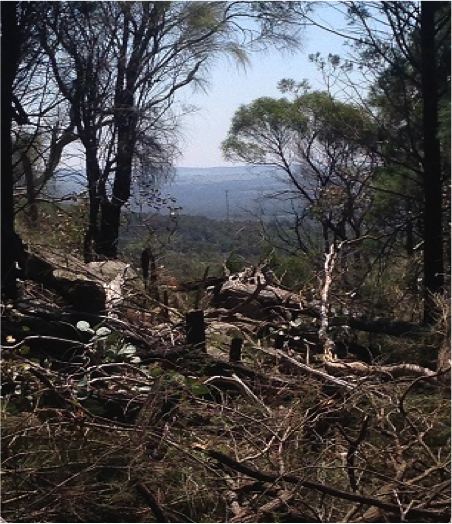
After comparing plans, we chose a provider and signed up. Surely if we could get mobile coverage we could get fixed wireless……. But it was not going to be that simple. When the installer came out to do a signal test, the result was not good, -106dBm. The cutoff was -96dBm. No install for us. After calls to the RSP, NBN etc,the verdict was we’d have to wait for the satellite service. But, being as stubborn as I am, I started doing a bit of research to work out why we could not get it. After researching the tower locations on the mynbn.info website and checking on Google maps, I worked out the signal was blocked by a granite ridge behind the house. What about a mast on the hill I thought? More calls to NBN and the result was bad luck, we were listed as unable to get NBN. They wouldn’t send a tech out for another signal test, even though I could literally see the NBN tower from the top of the hill. Very frustrating!
The tower, clearly visible from the top of the hill
Fast forward a few months, I was put in touch with the team from BIRRR who not only had some great resources and information available on the page, but also worked hard to get us re-listed as Service class 5 (NBN Fixed wireless available, no NTD Installed) so that we could book another install!
Not wanting another fail, I studied as much as I could on fixed wireless technology, installation requirements etc. These can be found on the BIRRR pages, NBN Website, Whirlpool forums, ACMA Website etc. But to summarise; here are a few requirements:
You MUST be located within 14KMs of an active NBN Fixed wireless tower. Line of sight is recommended, as the frequency used is affected by terrain. Solid terrain such as hills etc will degrade the signal heavily, as will thick bush land. A few gums etc. will affect it but not as badly. It is the water in the foliage which interferes.
For a pass, the signal has to be at least -96dBm. The lower the number, the better the signal eg. -70dBm is better than -80dBm. Since this time, the cutoff point has been increased to -99dBm.
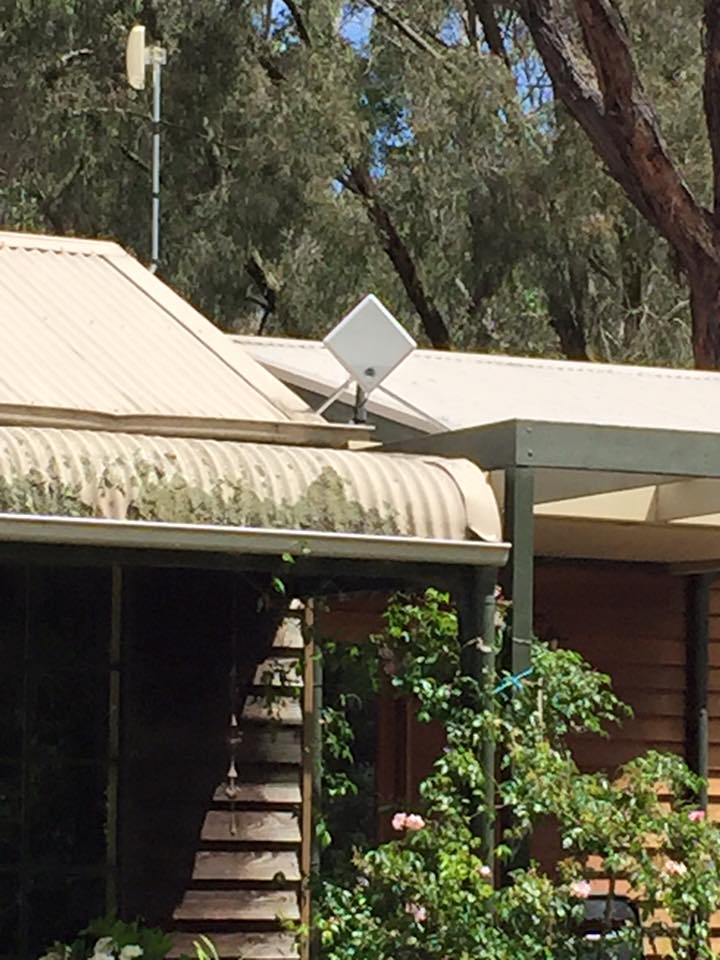
The install has 2 main components, the ODU (Out Door Unit, a panel antenna and modem) and the NTD (Network Termination Device). The maximum cable run between the 2 units cannot be more than 80 metres. This is the cable run, not the distance “as the crow flies”. The ODU has to be mounted where it gets a strong signal from the tower. The NTD must be mounted within 1.5 metres of a 240v power supply in a weatherproof enclosure that does not get too hot or cold.
The cable joining the two components must be run through white telecommunications conduit with no sharp bends at a minimum depth of 30cms underground from the building housing the NTD to the mast/building where the ODU is located. It needs to have a string line run through from one end to the other to feed the cable through, and this is much easier to do as you are joining the conduit as opposed to trying to feed it through the whole length.
If a mast or tower needs to be erected, it is the responsibility of the owner to have it in place and meeting any local legal requirements. It must be sturdy. A 10 metre length of gal pipe tied to a star-picket is a no-go… I would recommend buying a proper radio tower if needed. These can be sourced from Hills, Nally towers etc.
The installer is not responsible for ensuring access to the mounting location, the property owner is. This means if it is to be mounted on a 14 metre mast, the owner has to provide a cherry picker on the day of the install. No installer will climb a 14 metre tower, especially a home-made one.
NBN responsibility stops at the NTD. If you need to get the internet from that location to another location or to multiple devices, this has to be arranged by the owner at their own expense.
There may be things I have missed… I recommend doing your research and double-check everything. There are a lot of resources available on the BIRRR page including a guide to fixed wireless installs, both standard and non-standard.
Now that I had all the info required, I could get everything ready for the install.
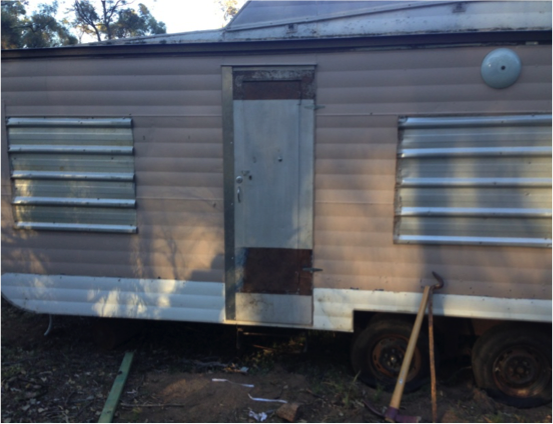
STEP 1: My first step was to put a building on a spot on the property where I could get a strong signal. After a bit of hunting around, I bought a cheap caravan for the purpose. My reasoning for this was that a caravan can be parked anywhere on your property without council approval providing nobody is living in it, whereas building a shed would need a development application approved. Check your local council regulations on this, as it may vary. I parked it as close to the top of the ridge as I could.
STEP 2: The second step was to put up a mast with line of sight to the tower. Since I had the van close to the ridge, the mast only needed to be above the height of any stray kangaroos etc. So I went with a 3 metre length of 1” galvanised pipe cemented 60cm into the ground, remembering the conduit end.
STEP 3: Digging the trench proved to be difficult, as the 20 metres closest to the mast was full of bush rock. There must have been about 10 ton of rock that I pulled out with a 4×4 bit by bit. After the trench was done, I ran the conduit. This was proper NBN Conduit available at a local electrical wholesaler for about $1/metre in 4.5 metre lengths. To make it even simpler for the installer, I ran the cable as I was going. This meant purchasing it myself, but it was a time-saver and on the day of the install the tech was grateful it was done. The cable has to be outdoor gel-filled Cat5e ethernet cable. I purchased this from an electrical supply store in Sydney at 88c/metre.
STEP 4: Due to the location, running a 240v power supply from the house to the van was not practical, so I installed a 250w solar panel and 330Ah battery bank with a sine-wave inverter for power. Being over the 90 metre limit for Ethernet to the house, I decided that a wireless bridge was the logical step. When setting these up, you have to be careful not to exceed the maximum power limit of 4 watts EIRP for broadcasting, or the ACMA can hit you with massive fines. If you are going this route, I would recommend getting it installed by a professional if you are not experienced with wireless networking.
Now that all the prep work had been done, I booked an install through SkyMesh (who I have to say are brilliant to deal with, it’s a good change waiting on the line for just a few minutes and talking to an Aussie) and on the 30th of December 2015, the tech showed up on time, did a quick signal test and the result was great… -60dBm! Well within the limits.
Within an hour it was all installed and after a bit of a wait, we were activated!
After all that work, there was a happy ending!
These speeds are about the average we receive now, and so far the setup has proved to be fairly reliable.
I would like to thank Kristy Sparrow and the team at BIRRR, Skymesh and NBN. For making this possible and turning an extremely frustrating situation around for a positive outcome.
Disclaimer: This document is meant as an informative document based on my own research and experience. Any views, opinions, information etc. provided is not necessarily the same as that provided by NBN Co, BIRRR, SkyMesh or any other organisation referred to here. Prepared for BIRRR by Kain Fitzgerald.








 Better Internet for Rural, Regional & Remote Australia (BIRRR)