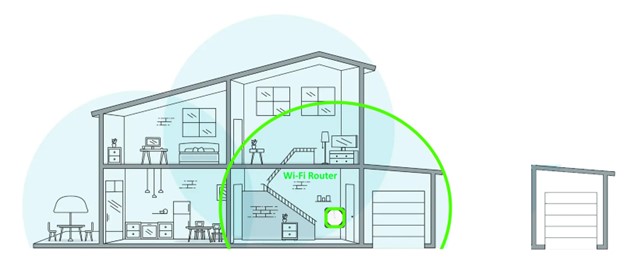
A Wi-Fi router enables multiple devices to connect to the internet and share a single broadband connection, whilst providing security and network management functions. For a smaller home a single Wi-Fi router may provide satisfactory coverage.
Note: Discuss your router requirements with your provider, as they generally support the routers they provide or recommend.
802.11.ac – Wi-Fi 5, or 802.11.ax – Wi-Fi 6?
ACin the router name indicates Wi-Fi 5 and AX, Wi-Fi 6. Wi-Fi 6 is the latest and current Wi-Fi standard and Wi-Fi 5 devices are increasing unavailable.
AX3000 indicates a device with 3,000Mbps of theoretical bandwidth. The greater the number, the greater the capacity of the router to connect many clients at good speed; however, do consider that your actual internet connection capacity may only be 50Mbps or less depending on your internet connection. You’ll need Wi-Fi 6 devices, tablets, laptops and smart phones to benefit from the additional efficiency, however Wi-Fi 6 routers will work with Wi-Fi 5 devices and earlier Wi-Fi releases. The more powerful the router the greater the cost, the greater the speed, number of active clients and system capacity. The trick is finding the happy medium for your situation at a reasonable cost.
Our recommended routers support a future Mesh network
A mesh network or system provides for additional routers or mesh extenders that creates coverage to rooms where the Wi-Fi signal is weak.
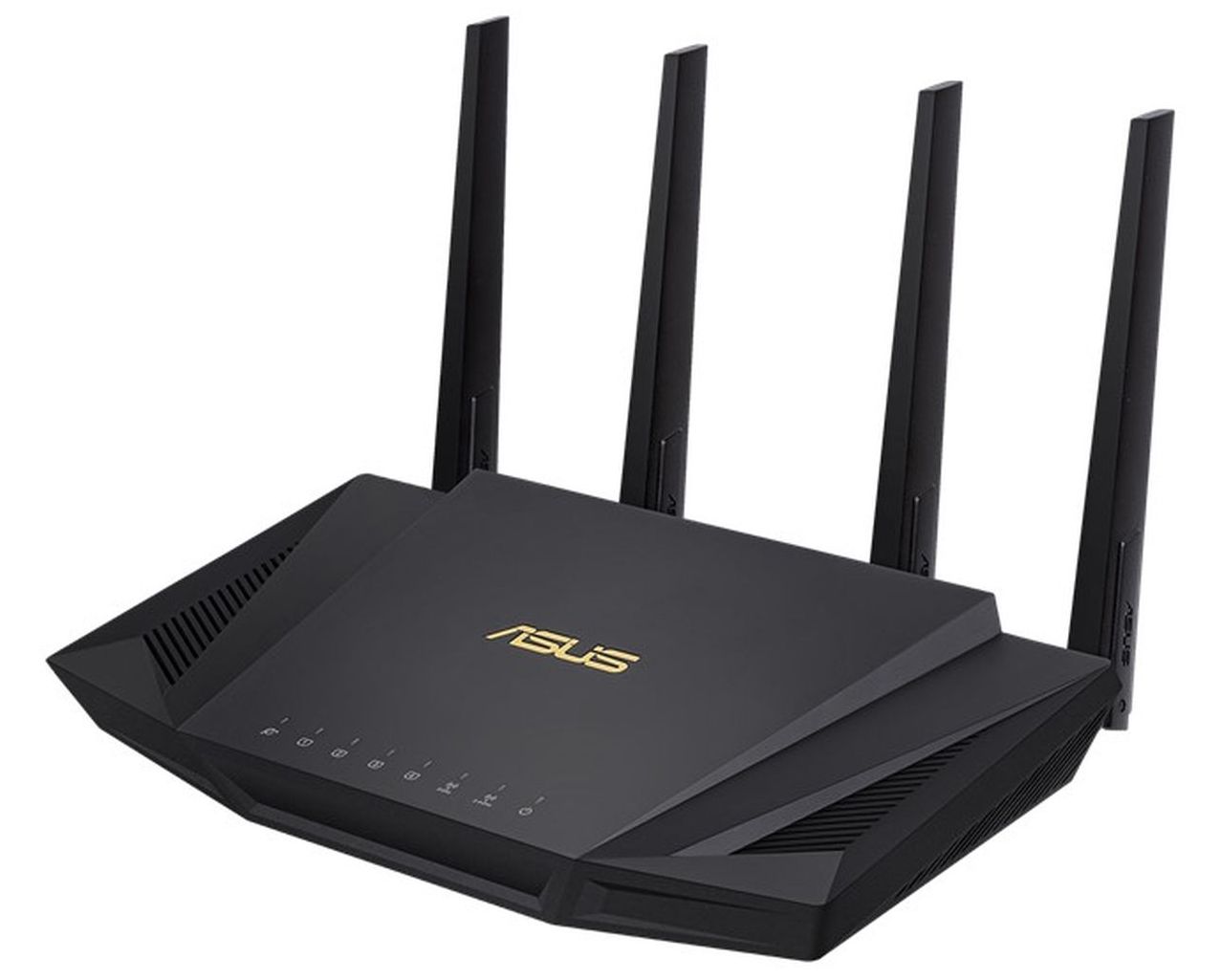
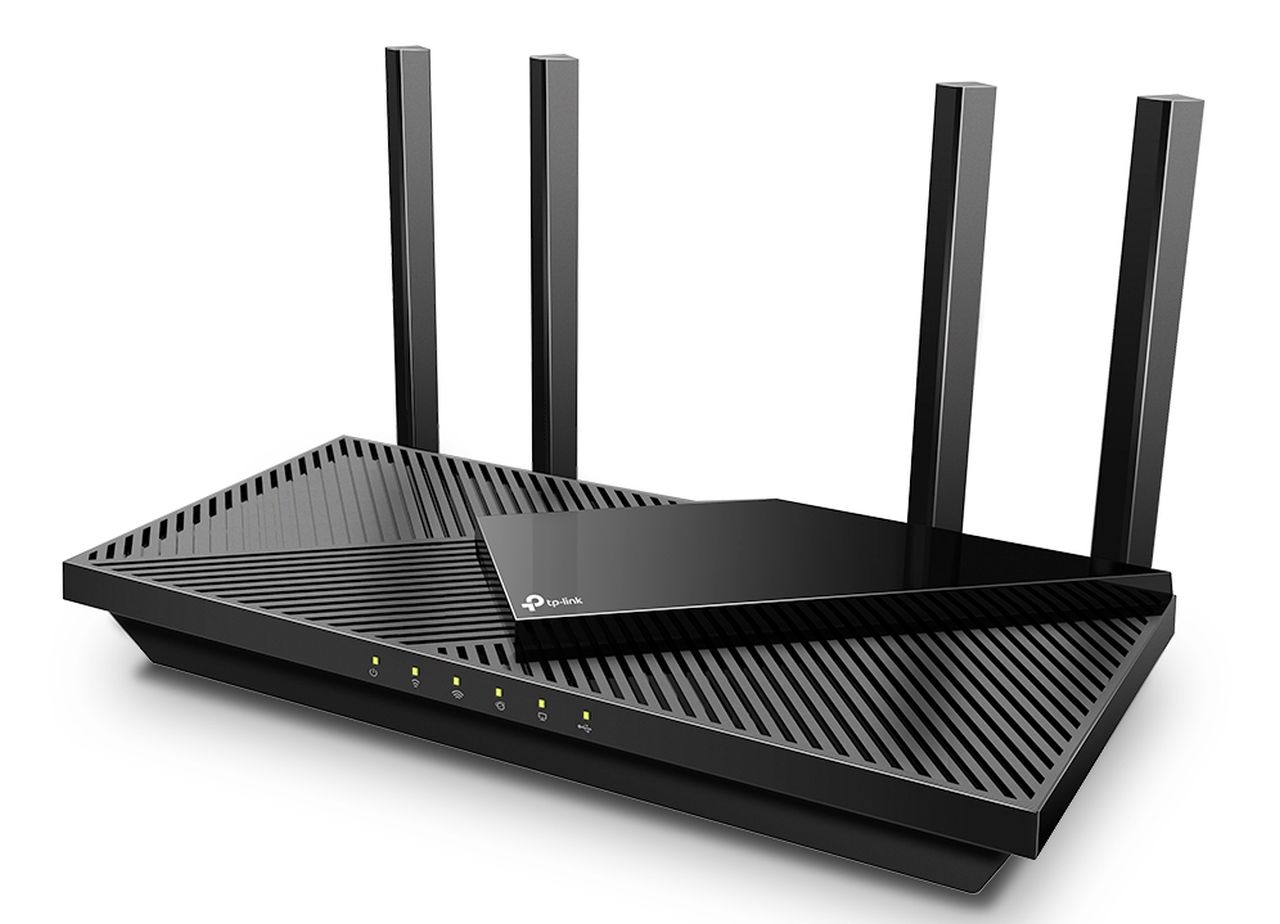
Recommended mid-range AX3000 Wi-Fi 6 routers with this capability are the ASUS RT-AX58U, at around $300 and the TP-Link Archer AX55, at less than $200.
This 802.11ax (Wi-Fi 6) 3,000Mbps theoretical bandwidth router provides excellent capacity and coverage for a large home. Two ASUS RT-AX58U will extend coverage using the proprietary Asus AiMesh feature. A very useful feature of most Asus routers is Traffic Analyser – Statistics, which details the 24-hour usage of every connected client.
It identifies the amount and time of high usage clients and will greatly assist in maintaining traffic usage within quota.
This 802.11ax (Wi-Fi 6) 3,000 Mbps theoretical bandwidth beamforming router provides excellent capacity and coverage for a large home. Extend coverage with TP-Link proprietary OneMesh and additional TP-Link mesh extenders. https://www.tp-link.com/au/onemesh/product-list/
Recommended Router Features
Both routers provide mesh capability if you buy an additional AiMesh router (Asus), or OneMesh extender (TP-Link). A ‘mesh network’ will extend your wi-fi coverage. A maximum of five Asus AiMesh routers is recommended. For TP-Link, that’s the router plus four mesh extenders. The TP-Link hard limit is a total of eight devices.
Both Asus and TP-Link provide a smart phone router App for easy management.
Wi-Fi 6 is backwards compatible. It requires Wi-Fi 6 compatible devices to realise the Wi-Fi 6 efficiency advantage.
Please buy local if possible.
If you have had your (most likely old and slow) router since you had Sky Muster installed; it’s probably time for a change
*Please note, while all care has been taken in compiling BIRRR documents, we recommend that you check with your service provider regarding your own connection issues.Thanks to John Kitchener, Chris Dowling & Tim Stockman for helping us with router advice.
The above diagram represents the key technologies that are typically deployed to ensure Wi-Fi coverage in the home and extended home environment.
Most systems start with a quality Wi-Fi Router which connects to the internet source such as the nbn Network Termination Device or NTD. This network is shown in green.
Should the single Wi-Fi router fail to service all corners of the home, a Mesh System is required. A mesh system allows a device to remain connected as it roams the home e.g a smartphone or tablet. The three-device meshed network is identified, by green, orange and blue.
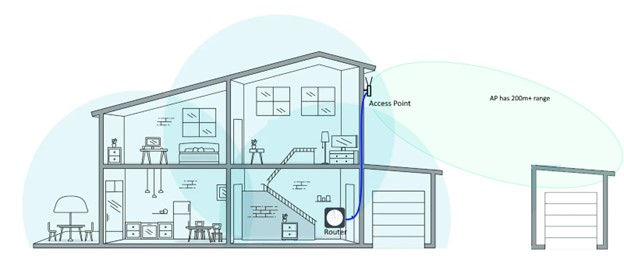
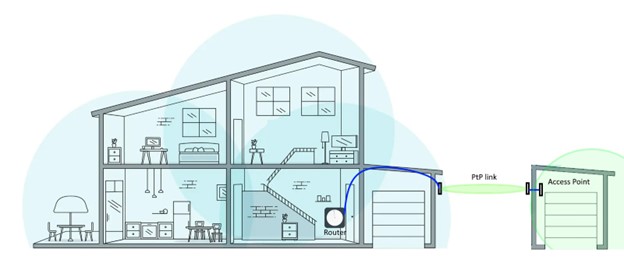
If Wi-Fi coverage is required in the yard and up to 300m away, an External Access Point can be added. Handheld or fixed devices within range, can access the internet.
If Wi-Fi coverage is required in a nearby building or at some more remote location, a Point-to-Point Transparent Bridge and Access Point is provided.
Details of each of these solutions follows.
The Wi-Fi Router
For a smaller home a single Wi-Fi router may provide satisfactory coverage.
A Wi-Fi router enables multiple devices to connect to the internet and share a single broadband connection, whilst providing security and network management functions
Some routers can form the genesis of a future mesh system. Several good mid-range routers with this capability are identified in the RECOMMENDED nbn SKY MUSTER ROUTERS article here.
802.11.ac – Wi-Fi 5, or 802.11.ax – Wi-Fi 6?
AC indicates Wi-Fi 5 and AX, Wi-Fi 6. Wi-Fi 6 is the latest and current Wi-Fi standard and Wi-Fi 5 devices are increasing unavailable.
AX3000 indicates a device with 3,000Mbps of theoretical bandwidth. The greater the number, the greater the capacity of the router to connect many clients at good speed; however, do consider that your actual internet connection capacity may only be 50Mbps or less depending on your internet connection.
You’ll need Wi-Fi 6 devices, tablets, laptops and smart phones to benefit from the additional efficiency, however Wi-Fi 6 routers will work with Wi-Fi 5 devices and earlier Wi-Fi releases.
The more powerful the router the greater the cost, the greater the speed, number of active clients and system capacity.
The trick is finding the happy medium for your situation at a reasonable cost.
A mesh system
The mesh network is an evolution of the earlier days of wireless extenders.
As Google Nest (a mesh system) explains “A mesh network is a group of connectivity devices, such as Wi-Fi routers that act as a single network, so there are multiple sources of connectivity around your house instead of just a single router”.
If you google “Best Wi-Fi Mesh Systems”, you will be met with a bewildering array of mesh systems. Choose a system that is within your budget and suitable for your coverage needs.
The mesh has a primary router that manages DHCP as for the simple Wi-Fi router solution i.e. one main router and several slave routers. The slave routers act as meshed access points.
The mesh elements must be placed not too far and not to close ie in the Wi-Fi Goldilocks zone where they can securely wirelessly connect, but usefully extend the coverage area. The primary and slave routers may present additional LAN ports for a wired connection at that location.
Some Wi-Fi routers can form the genesis of a mesh system, such as the TP-Link Archer OneMesh and Asus AiMesh routers and mesh extenders.
An external wired Access Point (AP)
For some circumstances a good external AP mounted on an external wall (or higher) may provide reliable service to a Wi-Fi device out to 300m or so with clear line of sight and little to no obstructions. It may reliably service a nearby building.
The AP also handles the security of the wireless network, such as implementing WPA2 encryption to protect against unauthorized access.
Perhaps try this option first (before a Point to Point system), as the AP can be re-deployed as part of a PtP system should the situation require a wireless bridge.
The TP-Link EAP225 is AC1200 (2.4Ghz 300Mhz + 5Ghz 867Mhz) and comes complete with a PoE (Power over Ethernet) supply. It is easily configured and managed via a smartphone App.
It requires connection via an ethernet cable from a spare LAN port on the in-home Wi-Fi router. The TP-Link EAP225 Outdoor is about $150.
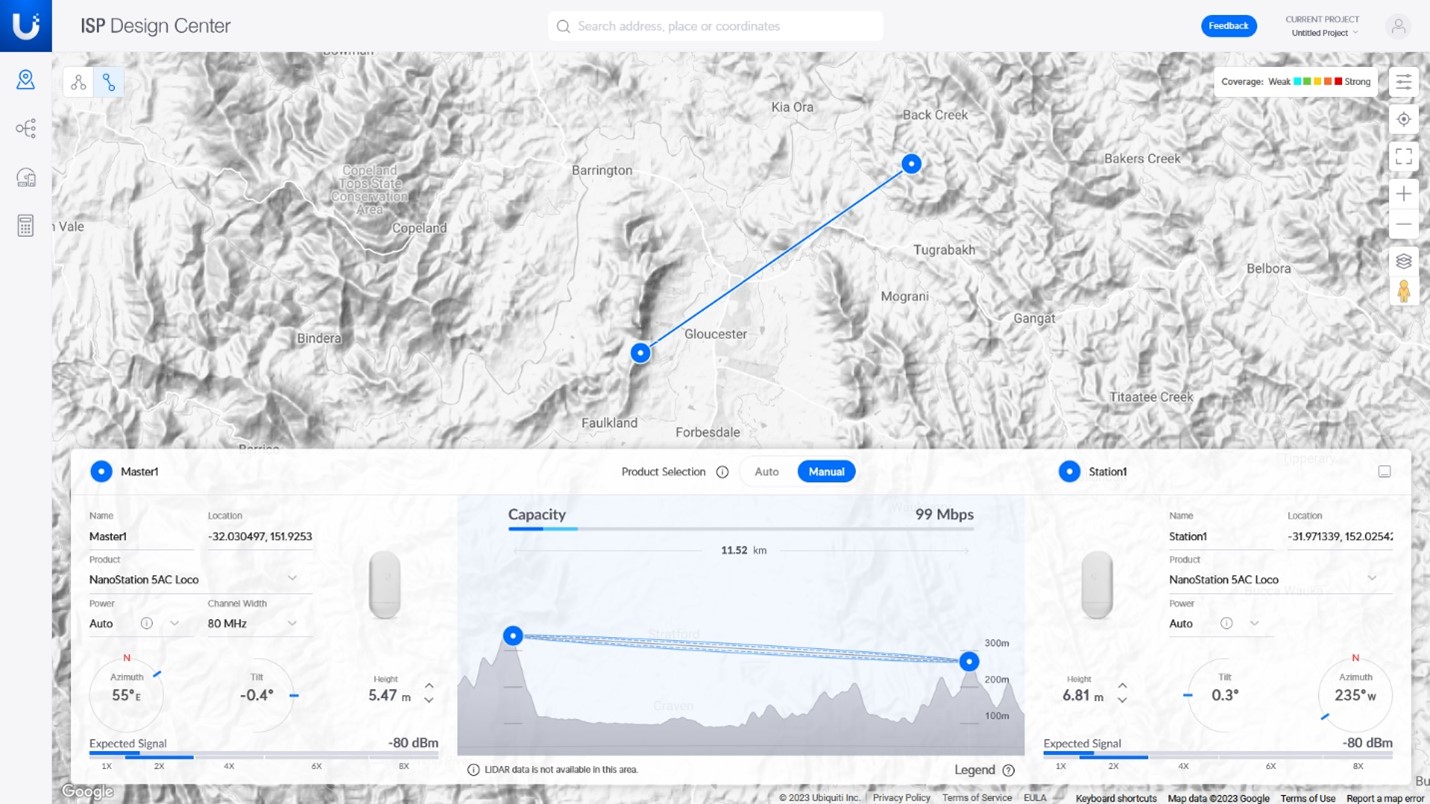
For Ubiquiti PtP and PtMP products you may check the link path and performance using the powerful Ubiquiti link calculator, see https://ispdesign.ui.com/#
Ubiquiti’s ‘ispdesign’ is applied to an 11.2Km link using Nanostation 5AC locos.
Note: A +23dBm transmitter coupled to a 13dBi antenna creates an EIRP of +36dBm.
Should you engage a professional, obtain a quote which details all work AND MOST IMPORTANTLY, the expected outcome e.g., link speeds, compliance etc. Ensure that the installer provides all necessary passwords and that the system operation is clearly explained. Ensure that a link budget is provided prior to demonstrate the performance.
What does a PtP link do?
A PTP link creates the wireless equivalent of a LAN cable connection. Think of the PtP wireless link as a long length of LAN cable. Security of a Wi-Fi P2P link is established using encryption techniques such as WPA2 to prevent unauthorized access.
There are many PtP link systems available. The systems identified below perform well, are readily available and are at the least cost end of the market. A PtP system with ‘up to 450Mbps throughput’ supports Starlink, nbn Fixed Wireless and most nbn fixed line services.
Ubiquiti AC PtP system – 13dBi compact antenna
A pair of Ubiquiti Nanostation Loco 5AC’s can provide a throughput of up to 450Mbps (225Mbps send + 225Mbps receive) at around 1Km. Given the modest antenna gain and power, this device readily meets the +36dBm EIRP regulatory requirements.
Ubiquiti ispdesign calculation for a 1Km link, identifying a throughput of 497Mbps
The Ubiquiti Nanostation Loco 5AC with perfect ‘line of sight’ may provide useful service at a distance of up to 10Km. At 11.3Km (see the Ubiquiti ispdesign example earlier), the transmit and receive throughput drops to ~50Mbps send and ~50Mbps receive.
See https://www.ip-com.com.cn/en/product/iLBE-5AC.html Another high gain antenna system with a throughput of 450Mbps. The iLBE-5AC uses a proprietary ipMAX IP-COM TDMA (Time Division Multiple Access) protocol. Cost for two is around A$250. The PoE power supply is included.
*Please note, while all care has been taken in compiling BIRRR documents, we recommend that you check with your service provider regarding your own connection issues.Thanks to John Kitchener, Chris Dowling & Tim Stockman for helping us with advice.





 Better Internet for Rural, Regional & Remote Australia (BIRRR)